Introduction #
This plugin allows you to integrate data from REST API sources seamlessly.
Installation #
This is a commercial plugin. For detailed activation instructions, please refer to: Commercial Plugin Activation Guide
Adding a REST API Source #
After activating the plugin, you can add a REST API source by selecting it from the Add new dropdown menu in the data source management section.
Configure the REST API source.
Adding a Collection #
In APES, a RESTful resource is mapped to a Collection, such as a Users resource.
GET /users
POST /users
GET /users/1
PUT /users/1
DELETE /users/1
These API endpoints are mapped in APES as follows:
GET /users:list
POST /users:create
POST /users:get?filterByTk=1
POST /users:update?filterByTk=1
POST /users:destroy?filterByTk=1
For a comprehensive guide on APES API design specifications, refer to the API documentation.
Check the “APES API – Core” chapter for detailed information.
The Collection configuration for a REST API data source includes the following:
List #
Map the interface for viewing a list of resources.
Get #
Map the interface for viewing resource details.
Create #
Map the interface for creating a resource.
Update #
Map the interface for updating a resource.
Destroy #
Map the interface for deleting a resource.
Both the List and Get interfaces are required to be configured.
Debugging the API #
Request parameter integration #
Example: Configure pagination parameters for the List API. If the third-party API does not support pagination natively, APES will paginate based on the retrieved list data.
Please note that only variables added in the interface will take effect.
| Third-party API params name | APES params |
|---|---|
| page | {{request.params.page}} |
| limit | {{request.params.pageSize}} |
You can click Try it out to debug and view the response.
Response format transformation #
The response format of the third-party API may not be in APES standard, and it needs to be transformed before it can be correctly displayed on the front end.
Adjust the conversion rules based on the response format of the third-party API to ensure the output conforms to the APES standard.
Debugging process description
Extract error message #
When a third-party API throws an exception, its response format may not follow APES’s standard. In such cases, the error message needs to be transformed before it can be correctly displayed on the frontend.
If no error message transformer is configured, APES will apply the default transformation, converting the error into a message that contains the HTTP status code.
After configuring an error message transformer to match APES’s output standard, the frontend will be able to properly display the exception messages returned by the third-party API.
Variables #
The REST API data source supports three types of variables for API integration:
- Custom data source variables
- APES request variables
- Third-party response variables
Custom Data Source Variables #
APES Request #
- Params: URL query parameters (Search Params), which vary depending on the interface.
- Headers: Custom request headers, primarily providing specific X- information from APES.
- Body: The request body.
- Token: The API token for the current APES request.
Third-Party Responses #
Currently, only the response body is available.
Below are the variables available for each interface:
List #
| Parameter | Description |
|---|---|
| request.params.page | Current page |
| request.params.pageSize | Number of items per page |
| request.params.filter | Filter criteria (must meet APES Filter format) |
| request.params.sort | Sorting criteria (must meet APES Sort format) |
| request.params.appends | Fields to load on demand, typically for association fields |
| request.params.fields | Fields to include (whitelist) |
| request.params.except | Fields to exclude (blacklist) |
Get #
| Parameter | Description |
|---|---|
| request.params.filterByTk | Required, typically the current record ID |
| request.params.filter | Filter criteria (must meet APES Filter format) |
| request.params.appends | Fields to load on demand, typically for association fields |
| request.params.fields | Fields to include (whitelist) |
| request.params.except | Fields to exclude (blacklist) |
Create #
| Parameter | Description |
|---|---|
| request.params.whiteList | Whitelist |
| request.params.blacklist | Blacklist |
| request.body | Initial data for creation |
Update #
| Parameter | Description |
|---|---|
| request.params.filterByTk | Required, typically the current record ID |
| request.params.filter | Filter criteria (must meet APES Filter format) |
| request.params.whiteList | Whitelist |
| request.params.blacklist | Blacklist |
| request.body | Data for update |
Destroy #
| Parameter | Description |
|---|---|
| request.params.filterByTk | Required, typically the current record ID |
| request.params.filter | Filter criteria (must meet APES Filter format) |
Field Configuration #
Field metadata (Fields) is extracted from the CRUD interface data of the adapted resource to serve as the fields of the collection.
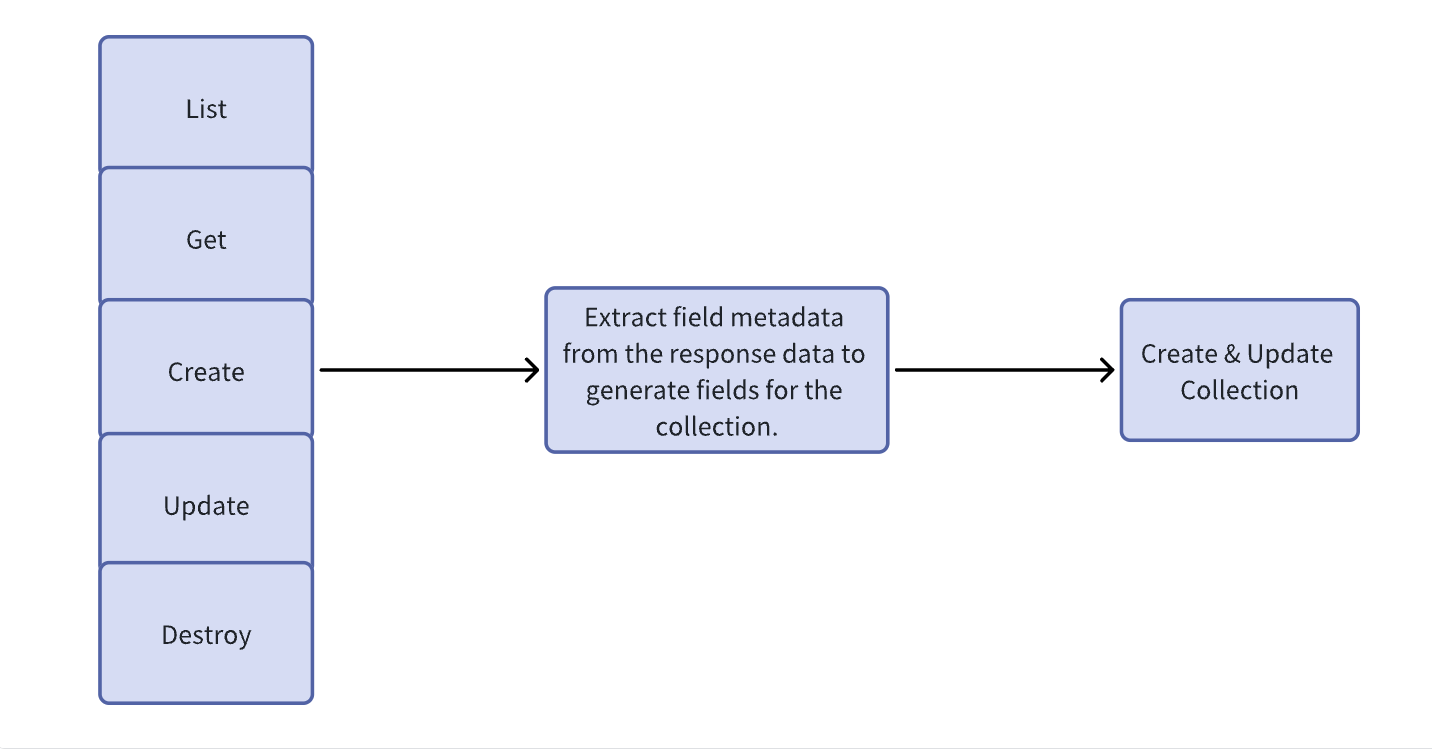
Extract field metadata.
Fields and preview.
Edit fields (similar to other data sources).
Adding REST API Data Source Blocks #
Once the collection is configured, you can add blocks to the interface.


