A sales representative should not be able to approve their own discount request. A warehouse clerk should not be able to open payroll. A new hire should not be able to delete records that took years to build up. None of this is a technical problem so much as it is a basic fact about how real organisations work, and any platform that runs a business process has to take it seriously from the start, not add it in later as an afterthought.
APES handles this through roles. This post explains what a role actually is, how far its protection really goes, and what happens when someone tries to hand out more access than they should.
What a Role Actually Is
A role in APES is a named bundle of permissions, built as part of a module and then handed out to real people afterward. It says what someone holding that role is allowed to do, such as reading a certain type of record, creating one, editing one, or deleting one, and it can be as broad or as narrow as the business actually needs.
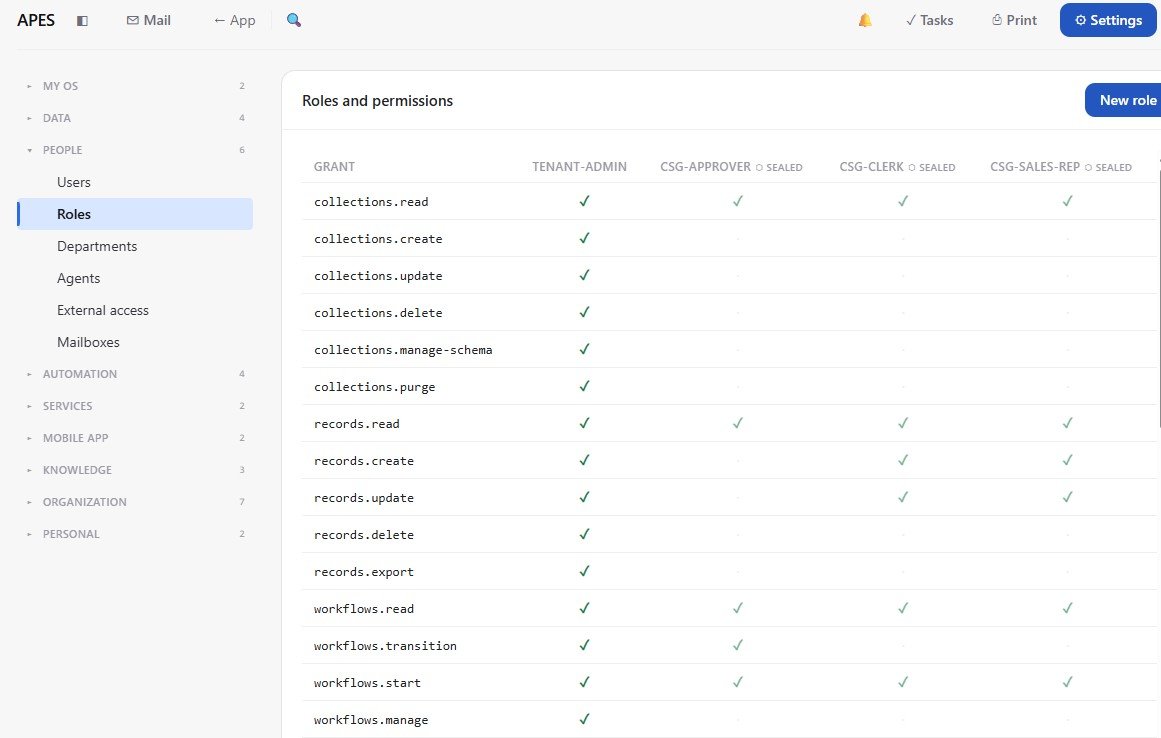
The stock transfer module referenced throughout this series is a useful real example. It ships with roles such as Consignment Approver, Consignment Clerk, and Consignment Sales Rep, each one shaped around what that job actually involves. An approver can decide on a transfer. A clerk can process the everyday paperwork around one. A sales rep can raise a request but does not get to approve their own. None of this is decided by convention or good intentions, it is enforced the same way every time a record is touched.
The actual roles behind the stock transfer module used throughout this series. Tenant-admin holds every grant, while Consignment Approver, Consignment Clerk and Consignment Sales Rep are each given only what their job needs, visible here as a real permission matrix rather than a description of one.
A Guarantee That Cannot Be Loosened Later
Some rules are more important than the rest, and APES has a separate mechanism for exactly those. Alongside ordinary roles, a module can declare a permission floor, which is a hard limit on who is allowed to hold a particular permission at all. A ledger might be built so that nobody, regardless of role, is allowed to delete an entry from it once it has been written.
What makes a floor different from an ordinary permission setting is that a workspace cannot loosen it later. A business can narrow a floor further if they want to be even stricter, but they cannot open it back up, and this protection is not something a workspace administrator can quietly switch off either. It is checked the moment someone tries to grant that permission, and it is checked again the moment someone actually tries to act on it, so it is not something that can be bypassed by finding a different route in.
Not Just What Someone Can Do, But Whose Records They Can See
A role decides what kind of action is allowed, but a real business often needs a second layer on top of that, which is whose records a particular action applies to. Two people can hold the exact same role and still need to see different things. APES supports this directly, rather than leaving it to be worked around in the application logic of every individual workflow.
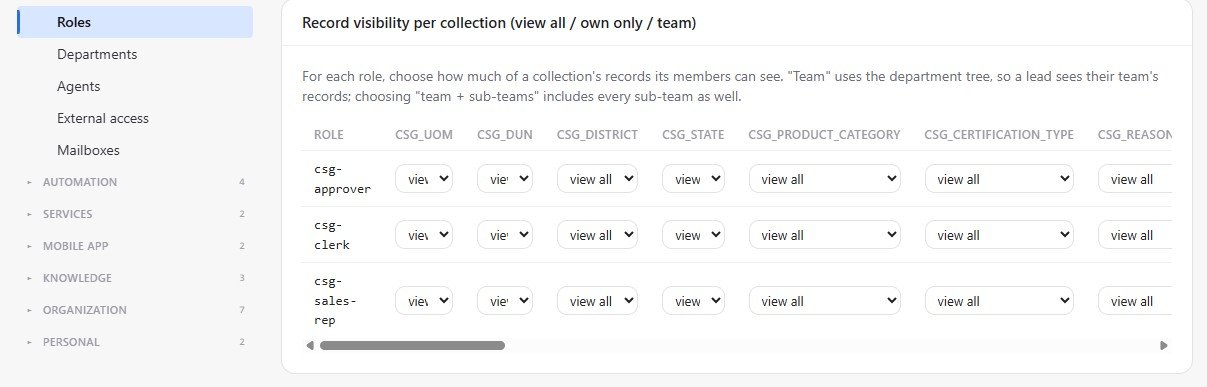
A role can be limited to only the records a person created themselves, which suits something like a personal request or draft. It can be extended to cover an entire team or department, which suits a manager who needs visibility over their group's work without seeing the whole company's. It can also be limited to records where a specific field matches something about that person, which covers cases that do not fit neatly into either of the first two. And of course, a role can simply have no such limit at all, for the people who genuinely do need to see everything within their area.
The same three roles, this time controlling whose records they can see rather than what they can do with them. Each role can be set per collection to view all records, only their own, or their team's, so two people holding the same role can still be scoped differently depending on what the business needs.
Nobody Can Hand Out More Than They Already Have
There is one more protection worth explaining, because it closes off a mistake that is easy to make without noticing. When someone builds a new role into a module, that role is created under their own authority, not some abstract system authority. If they try to grant a permission they do not personally hold themselves, the platform refuses that outright and says exactly which permission was the problem, rather than quietly leaving it out and letting the person discover the gap weeks later when something unexpectedly fails.
This matters more than it might sound like at first. Without a rule like this, it becomes possible, entirely by accident, for someone to build a role that is more powerful than they are, simply because they were not paying close attention to every line of what they were creating. Refusing that outright, immediately, and by name, is a small design choice with a large effect on how much a team can trust what they have actually built.
Turning a Role Into a Real Person
None of this means anything until an actual person is attached to a role, and APES keeps that step deliberately separate from everything described above. A role's definition, what it can do and where its limits sit, travels with the module itself. Who actually holds that role in a given business is decided afterward, by a person, inside that workspace's own People settings, and it is never something that gets shipped or silently applied on someone's behalf.
This ties directly back to two things covered earlier in this series. It is the same role assignment described in the post about human tasks, where a task can be routed to whoever currently holds a particular role rather than a fixed individual. And it is also what makes the audit trail described in the security post meaningful in the first place, because a run is only worth attributing to a person if the system is equally clear about what that person was and was not allowed to do at the time.
Access That Matches How the Business Actually Works
Put together, roles, floors, and record level scope give a business something more useful than a single on or off switch for who can use the system. They give a shape that can actually match how the organisation itself is structured, without depending on everyone remembering to be careful, and without a workspace being able to accidentally loosen a rule that was meant to be permanent.
The next post in this series returns to the integrations first mentioned at the very start, and walks through several of them together, showing what is actually available in APES today beyond the single deep dive already covered.