Consignment Stock Management Software for Distributors
If you distribute goods on consignment, you already know the uncomfortable truth about your balance sheet. The stock still belongs to you, but it sits on someone else's shelf, in someone else's backroom, handled by someone else's staff. You paid for it. You cannot see it.
Most distributors manage this the only way they can: a spreadsheet per outlet, a WhatsApp group with the sales reps, and a monthly visit where somebody counts the shelves and tries to make the numbers agree. It works while you have five outlets. It stops working at fifty, and it fails quietly, because nobody notices stock going missing until the year-end write-off.
This article walks through what changes when consignment becomes a system instead of a habit, using the consignment module that already runs production workloads on the APES platform.
Why consignment breaks spreadsheets
Consignment is awkward because the usual signal of a sale is missing. In a normal shop, the till tells you what sold. In a consignment arrangement, the outlet sells your product, but the sale does not reach you in real time. What reaches you is a count.
That means the real question every month is not “what did we sell?” but “what is on the shelf now, compared with what should be there?” The difference between the two is where your sales, your breakages, your expiries and your losses all hide together.
A spreadsheet cannot protect that difference. Anyone can edit a cell. A transfer between two outlets gets typed into one sheet and forgotten in the other. A damaged carton is written off with no approval. An adjustment is made “just to make it balance,” and six months later nobody remembers who made it or why.
Start with the structure: principals, outlets and products
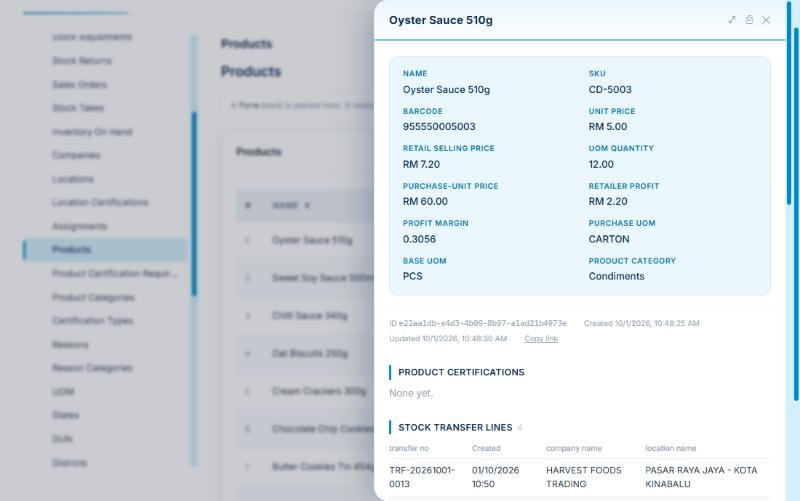
APES models consignment the way the business actually works. You have principals and the consignee companies that carry their goods, each with one or more outlet locations. You maintain a product catalogue, and here is a detail distributors will appreciate: every product carries a base unit and a purchase unit with a conversion between them.
Think of a bottle of oyster sauce. The shop sells it by the piece, but you ship it by the carton of 12. APES stores both units and converts between them automatically, so a clerk can receive five cartons while the stock level quietly moves by 60 bottles. No more mental arithmetic at the loading bay, and no more cartons recorded as bottles.
If some of your products or outlets require certifications, the catalogue can hold customer-defined certification requirements too, so you can record which products need a certificate and which locations hold one.
Every movement needs a reason and an approval
Stock moves in only a few ways, and APES gives each one its own governed process: transfers between locations, adjustments for damage or correction, and returns back to you. Each movement is raised by a clerk, carries a reason chosen from a controlled list, and then waits for an approver.
Nothing posts until the approver says yes. When it does post, two things happen together. The on-hand snapshot for that product and location updates, and a line is added to an append-only stock ledger. Append-only is the important phrase. Nobody can quietly edit last March's movement, because the ledger does not allow editing. A correction is a new line that points back at what it corrects.
This is the difference between a record and evidence. When an outlet owner disputes a figure, you do not argue from memory. You open the ledger for that product and location and walk through every entry, who raised it, who approved it and when.
Each movement can also be printed as a proper document, a transfer note, an adjustment note or a return note, so the paper that travels with the goods matches the record in the system.
The stock take is where sales are discovered
Here is the idea that makes the whole module fit consignment rather than ordinary inventory. A stock take in APES does more than check the count. It is how sales are detected.
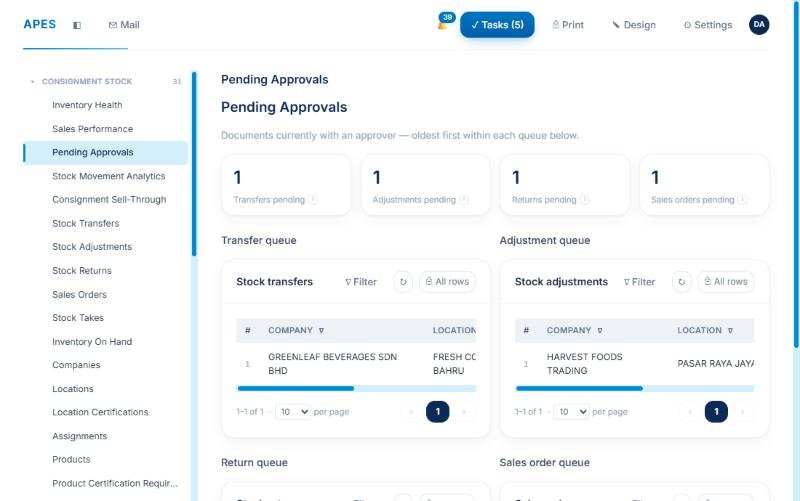
A rep visits the outlet and counts what is physically there. APES compares that count with what the ledger says should be there. If the system expects 240 packs of mixed nuts and the rep counts 177, the shortfall of 63 is treated as sold. From that shortfall, APES generates a sales order for approval, so the invoice that follows comes from a counted, approved figure rather than from the outlet's say-so.
It is worth being precise about what this means. You do not learn about a sale the moment a customer buys a bottle. You learn about it at the next physical count. That is the nature of consignment, and the module is built around it honestly rather than pretending to offer live till data it does not have. What you gain is a clean, repeatable monthly cycle where the count, the shortfall and the sales order are linked on one record.
The stock take also produces a printable stock-take form for the rep to carry, so counting at the outlet follows a fixed sheet instead of improvised notes.
See the whole network on one screen
Because every posting lands in the same ledger, reporting stops being a monthly reconstruction exercise and becomes a set of pages that are simply true.
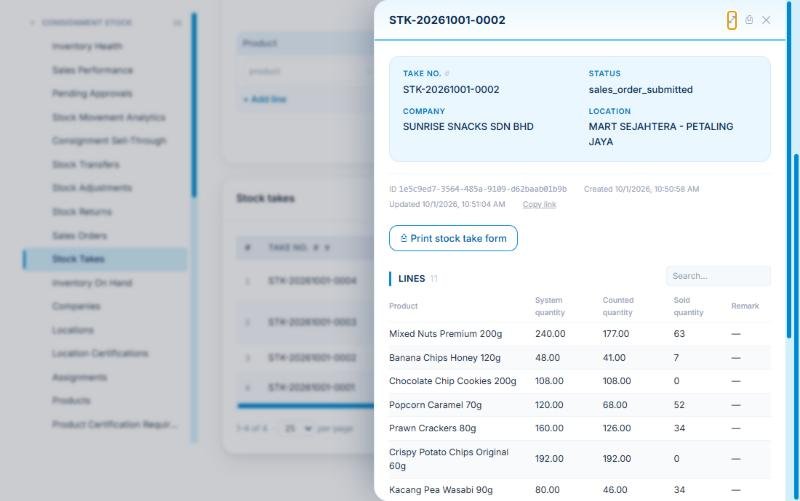
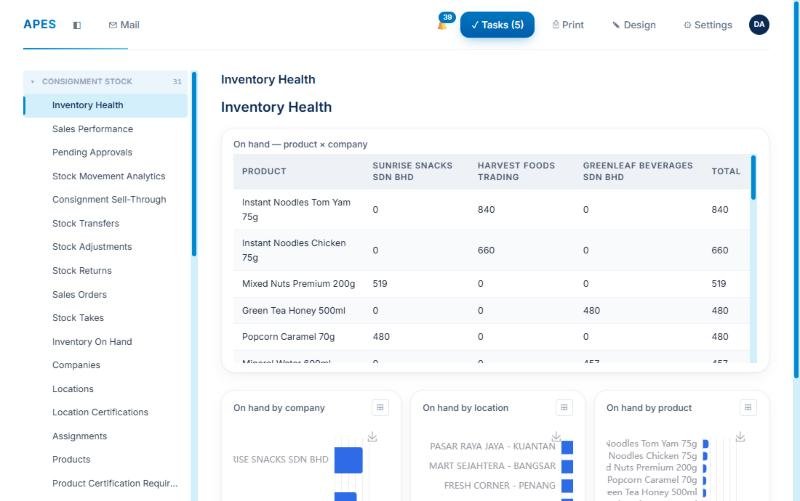
The Inventory Health page shows what sits where and what is running low. The Sales Performance and Consignment Sell-Through pages show how quickly stock placed at outlets turns into counted sales. Stock Movement Analytics shows where goods are travelling, and Pending Approvals shows what is stuck waiting on a person. For an owner, that last page alone is often a revelation: you can finally see which approvals are slowing the business down.
Roles keep the right people in the right seat
A clerk raises, an approver approves, and a sales rep counts and sells. APES ships these as separate roles, so the person who creates a movement is not the person who signs it off. The ledger and the stock levels themselves are protected, so they cannot be edited directly from the screen, only changed through the approved processes. That protection is what an auditor, or an anxious principal, wants to hear.
What this looks like in your first month
You do not have to move the whole business on day one. A realistic start looks like this.
First, load your companies, outlet locations and product catalogue from the spreadsheets you already have. Because your data is already in rows and columns, this is mostly a clean-up exercise rather than a rekeying marathon. Second, post your opening stock for each outlet, so the ledger starts from a counted position. Third, run your next monthly visit through APES: count, compare, approve and generate the sales orders. By the end of the first cycle you have a ledger you can trust and a monthly routine your reps can follow.
From there, add the extras at your own pace, such as certification rules for products that need them or the analytics pages for your management meeting.
Is this right for you?
APES for Consignment is a good fit if you place goods with dealers, retailers or sub-distributors who sell on your behalf, if you have more outlets than one person can visit weekly, and if you have ever written off stock you could not explain. It is a poor fit if you need live point-of-sale data from every outlet, because consignment counts, by their nature, arrive at visit time.
Bring us the process that hurts most
APES is built around a simple idea: start with the one process that costs you the most, put it under control, then expand. For many distributors, that process is the monthly outlet count. Show us your current spreadsheet, and we will show you the same data running as counted, approved and audit-ready inventory.
Talk to Appnicorn about consignment on APES.