Home » Equipment Rental Software: Track Every Item and Return
Equipment Rental Software: Track Every Item and Return
Equipment Rental Software: Track Every Item and Return
Every equipment rental business has had this conversation. A customer returns a scaffold coupler or a projector, and something looks wrong. The customer says it was already like that. Your counter staff say it wasn't. Nobody wrote anything down, so whoever argues harder wins. Usually that isn't you.
Rental runs on trust, and trust is thin evidence. You hand valuable equipment to people you barely know. You rely on memory, a paper form that may or may not have been filled in, and a whiteboard that shows what is supposedly out. Meanwhile an item that sits in the repair corner with no record, or goes out a day late with no chase, is revenue you won't get back.
This article shows how a rental business can run on a system built around the moments that matter. Those are handover, return, damage and delay.
Track items, not stock levels
Rental is different from retail in one basic way. You don't rent a quantity of drills. You rent this drill, which has its own asset tag, its own history and its own condition.
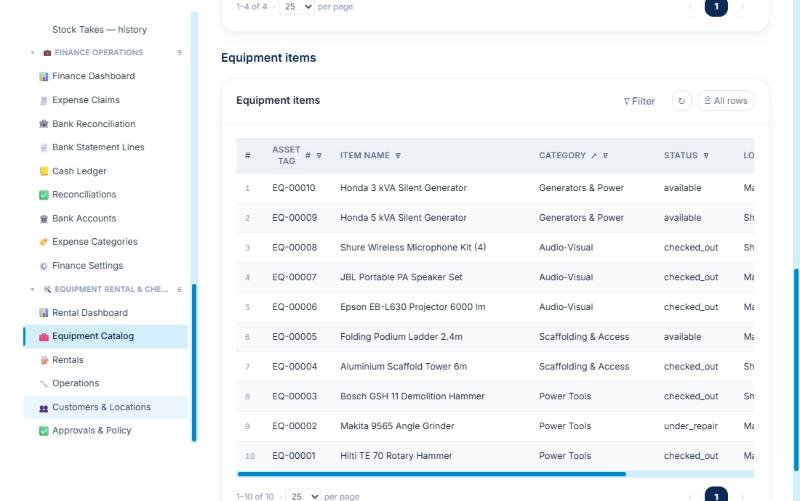
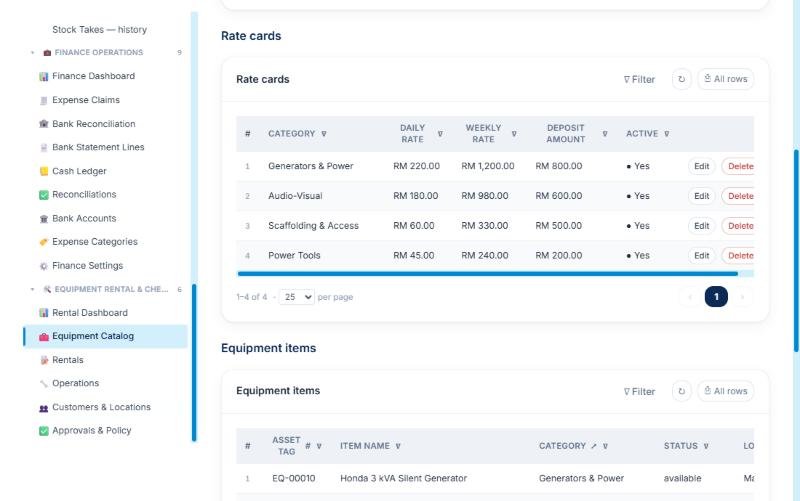
APES treats your fleet as individual items. Each one belongs to a category and sits at a location such as a warehouse or a branch. Rate cards set the price for each category. Every item keeps a count of how many times it has been rented, so you can see which pieces earn their keep and which are getting old. Each rental line shows the asset tag of the item it covers, which settles the question of which of the three identical generators the customer took.
The equipment catalogue. Every item has an asset tag, a category and a live status such as available, checked out or under repair.
Rate cards. Each category has a daily rate, a weekly rate and a deposit.
From booking to rental agreement
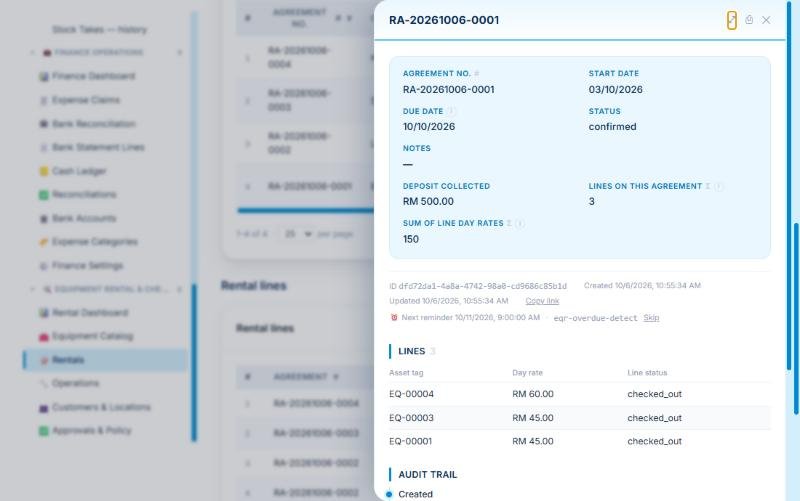
A rental starts as an agreement for one customer at one location. It has a line for each item. APES adds up the number of lines and the total daily rate on the agreement, so the counter staff can see the value of the booking straight away.
Customers sit in their own register, so a repeat renter is found and not retyped. The agreement also carries a due date. That date matters later, because the system watches it for you.
A rental agreement. It shows the deposit, the daily rate total and the three items on hire. The overdue check is already scheduled for the day after the due date.
Checkout: write the condition down before the item leaves
At handover the clerk checks out each line. The checkout records who handed the item over and what condition it was in. There is also a notes field for things like a scratched casing or a missing carry case. The item and the line are then marked as checked out, so the dashboard and the catalogue agree on what is on hire.
This removes the most common cause of disputes. When the item comes back you aren't comparing it with a memory. You are comparing it with a note made at the counter, at the time, by a named person.
Return: the inspection decides what happens next
When the item returns, the clerk records its condition again, along with who received it and whether it is damaged or late. The workflow then makes the next decision.
If the item is fine, it goes straight back into the pool and can be booked again. If it is damaged, it goes to maintenance. That way a broken item can't be rented to the next customer by mistake. It is a small piece of automation that protects your reputation as much as your equipment.
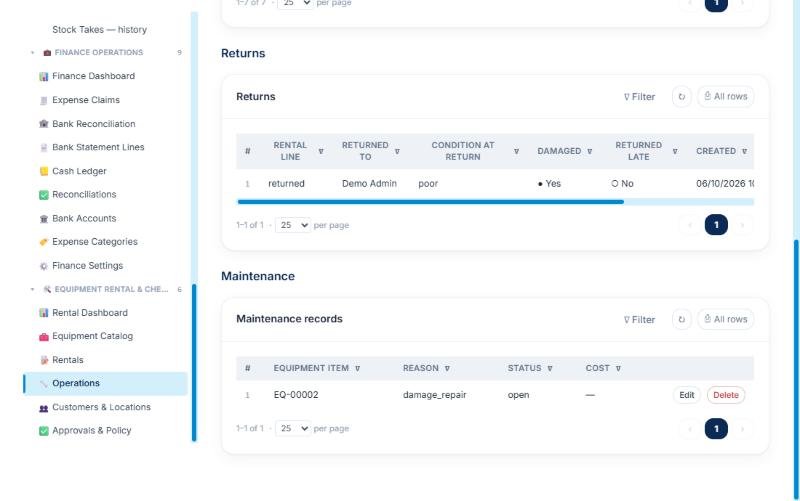
A damaged return recorded as poor condition, and the maintenance record opened for the same item.
Damage charges go through the right approval
A damaged return raises a damage charge on its own. A clerk assesses the cost and describes what is wrong. What happens next depends on a policy you set.
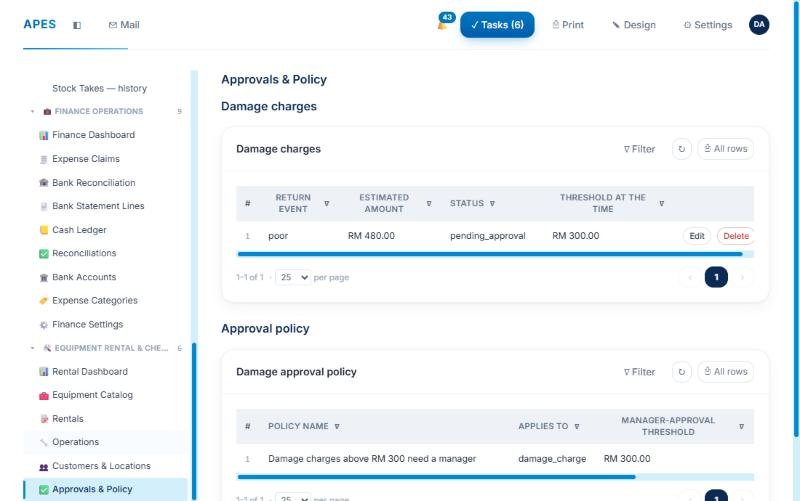
The policy has a threshold amount. Below it, the clerk's assessment can go ahead. Above it, a rental manager has to sign off before the charge can be billed. The charge also keeps a copy of the policy name and threshold that applied at the time. If you change the policy next quarter, last month's decisions still show which rule governed them.
So when a customer pushes back, you have an answer. The charge came from an inspection and an assessment. Where the amount was large, a manager made the call. It is all on one record.
A RM 480 damage charge waiting for approval. The RM 300 threshold that applied at the time is recorded next to it.
Overdue items flagged for you
Most rental shops find late returns when someone happens to look at the whiteboard. In APES the system checks the day after the due date. If the agreement is still open, it raises an overdue flag and tells the rental manager. The flag records how many days late the agreement is and who resolved it. Chasing a customer becomes a tracked task and not a hunch.
Many owners say this feature pays for itself first. A generator due back on Friday becomes a phone call on Saturday. It stops being a surprise at month-end.
Maintenance keeps the fleet honest
Equipment doesn't stay perfect. In APES, sending an item for repair takes it out of the rentable pool and opens a maintenance record. When the work is done, closing the record puts the item back. At every point the catalogue shows what can be rented today.
Over time the maintenance records and rental counts show which items cost more to keep than they earn. That tells you what to repair, what to retire and what to replace.
Two roles with clear jobs
The module comes with a rental clerk role and a rental manager role. Clerks handle the daily bookings, checkouts and returns. Managers take the decisions that involve money or risk. You can assign your people on day one.
The rest comes with the platform. You get user accounts, permissions and an audit trail of who did what. You can also adjust pages and forms so they use the words your team already uses.
Who this is for
It suits businesses that rent out individual items for a fixed period. Examples are power tools, scaffolding, audio-visual gear, camera equipment, party supplies and medical equipment. If you rent consumables or sell by quantity, a normal inventory tool is a better fit. If you have ever lost an argument about a scratch, this is for you.
Start with what costs you the most
You don't have to move your whole operation at once. Many rental businesses start with the return inspection and the damage approval, because that is where the money is won or lost. Bookings, overdue alerts and maintenance can follow.
Bring us your current rental form and your last three disputes. We will show you how each one would play out on APES, with the evidence already on record.