How APES Replaces the Spreadsheet a Growing Business Has Outgrown
Almost every business starts the same way. Someone opens a blank spreadsheet and starts typing in customer names. Someone else keeps a separate file for stock levels. Invoices sit in a shared folder, sorted by month. None of this feels like a system at the time. It just feels like getting organized.
For a small team, this approach works well enough. When there are only two or three people running the business, everyone can hold the whole picture in their head. The trouble is that this comfort does not last. As a business grows past its earliest days, the spreadsheets and shared folders that once felt organized start turning into the very thing slowing it down, and this is exactly the gap a platform like APES is built to close.
The trouble starts quietly, long before anyone notices it as a problem. A business hires its fourth employee, then its tenth. More people are now touching the same files. A stock count gets updated in one copy of the spreadsheet but not in the copy someone else is looking at. An order gets logged twice by two different people who did not know the other had already handled it. None of this happens because anyone was careless. It happens because a spreadsheet was never designed to be a shared system that many people rely on at once. It was designed for one person, working alone, solving one calculation at a time.
Where the cracks first show
The first sign is usually a disagreement over a number. A manager asks how many units are left in stock, and gets two different answers from two different people, each one confident they are right. Nobody did anything wrong. They just happened to be looking at different versions of the same file, updated at different times by different people.
The second sign is slower and harder to notice. Work starts getting duplicated. Someone spends an afternoon rebuilding a report that already exists somewhere else, because they did not know where to find it, or because the version they found looked out of date and they did not trust it.
The third sign is the one that costs the most, even though it rarely shows up on any invoice. Decisions start getting made on old information, because pulling a fresh number takes real effort. Someone has to open several files, copy numbers out of each one, and add them up by hand. By the time the number is ready, it may already be a few days old.
Why the fix is not a better spreadsheet
It is tempting to think the answer is stricter habits. Add a naming convention. Lock certain cells. Send a weekly reminder to back up the file. These habits help for a while, but they treat the symptom, not the cause. A spreadsheet has no idea who changed a number, or when, or why. It has no concept of a rule like “only a manager can approve a discount over a certain amount.” It cannot tell two people apart when they are both editing the same row at the same time.
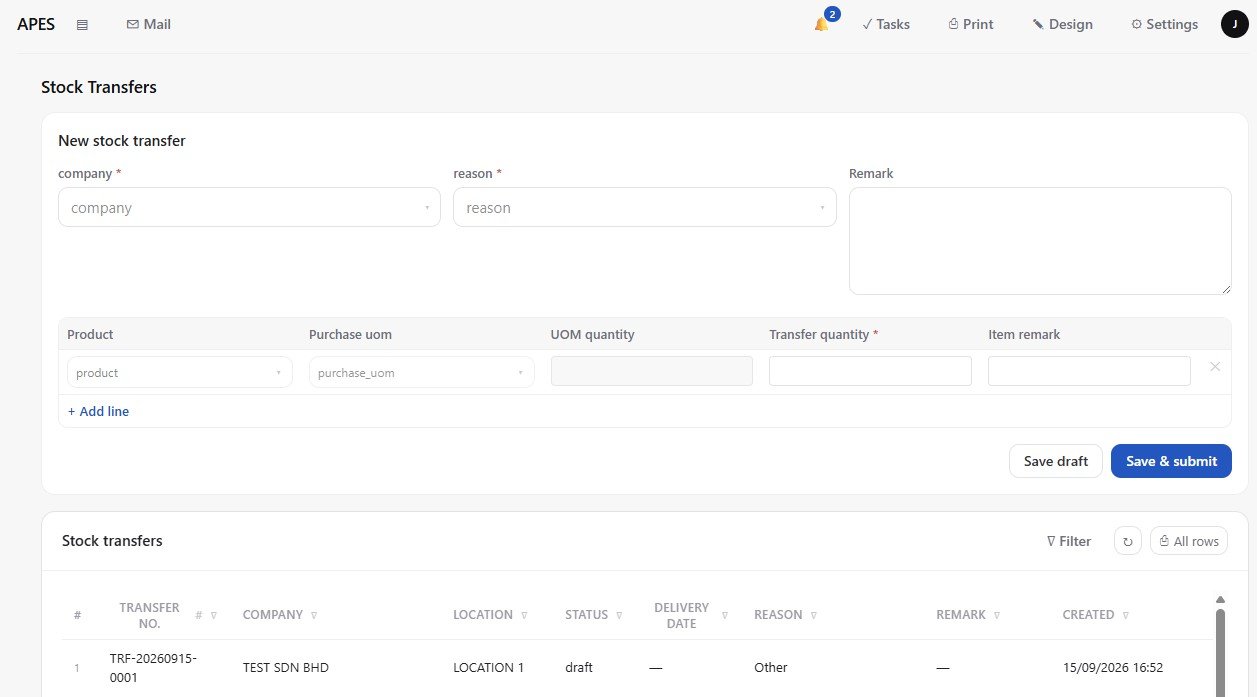
APES starts from a different place entirely. Instead of a shared file that anyone can edit however they like, a business sets up a collection, which is simply a structured record of one thing the business tracks, such as customers, stock items, or orders. Every record in that collection carries its own history, so it is always clear who created it, who last touched it, and what changed. There is no version to lose track of, because there is only ever one copy, shared live by everyone who needs it.
Where the rules of the business actually live
The deeper problem with a spreadsheet is not the file itself. It is that the rules of the business live only in people's heads. Who is allowed to approve a large discount. What has to happen before an order ships. Who gets notified when stock runs low. None of that is written down anywhere a system can check. It depends entirely on someone remembering, or on a habit that quietly falls apart the day that person is on leave.
In APES, these rules are built into the system itself, through roles and workflows. A role decides what a person can see and do, so a warehouse clerk and a sales manager are never working with the same set of permissions by accident. A workflow decides what happens next, so when an order needs approval, it does not depend on someone remembering to forward an email. It becomes a task sitting in front of the right person, and stays there, visible, until they act on it. If the amount is small enough, the workflow can even decide on its own that no approval is needed at all, following a rule the business set once and never has to repeat by hand again.
What day to day work actually looks like
The practical difference shows up in ordinary moments. A salesperson checking stock before confirming an order sees the exact same number the warehouse team sees, because there is only one number, not five copies of it scattered across different desks. A manager asking how the business is doing does not have to wait for someone to compile numbers from several files. The numbers are already live, because every part of the business that touches stock, sales, or approvals is writing to the same shared system as it happens, not at the end of the week when someone finally has time to update a spreadsheet.
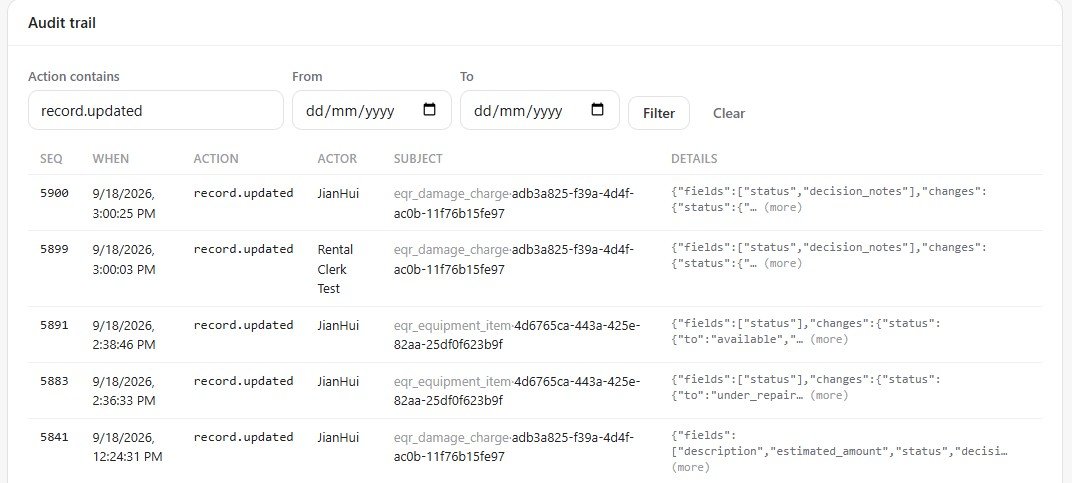
Every action also leaves a trace. If a price gets changed, or an order gets approved, or a record gets deleted, APES keeps an audit trail of exactly what happened and who did it. Nobody has to reconstruct the story from memory or from a chain of old emails, because the system already remembers it precisely.
Signs it might be time to move on
A business does not have to give up spreadsheets the moment it starts growing. Plenty of small teams run smoothly on them for years. But a few signs are worth paying attention to. If two people cannot agree on a number because they are quietly looking at two different files, that is worth noticing. If getting something approved depends on someone remembering to send the right message to the right person, that is worth noticing too. If nobody in the business can say with real confidence what happened yesterday, without spending the morning asking around and checking multiple files, the spreadsheet has quietly stopped doing its job.
None of this means the original spreadsheet was ever a mistake. For a business just starting out, it was probably the right tool, simple and immediate and free. It only stops being the right tool once the business has grown past what a single shared file was ever built to hold. At that point, the honest move is not to fight the spreadsheet harder, but to move the business onto a system built for what it has actually become, one where the data, the rules, and the history all live in one place, and everyone is finally looking at the same thing.