Whenever a business considers moving its records onto a new platform, the first worry is rarely about features. It is about safety. Who can see this data. What happens if someone's account gets compromised. Can anyone actually prove what happened if something goes wrong later. These are reasonable questions, and a lot of business software answers them poorly, treating security as an afterthought bolted on once the real work is already built.
APES treats this differently, because the platform assumes from the start that it will be handling real business data, not a demo. Below are five concrete ways this shows up in the actual product, not just in a policy document nobody reads.
Signing in is protected by more than a password
A password alone has never been a strong defense. It can be guessed, reused from another site, or simply written down somewhere it should not be. Most small business tools stop there anyway, because adding anything more feels like extra friction for very little benefit.
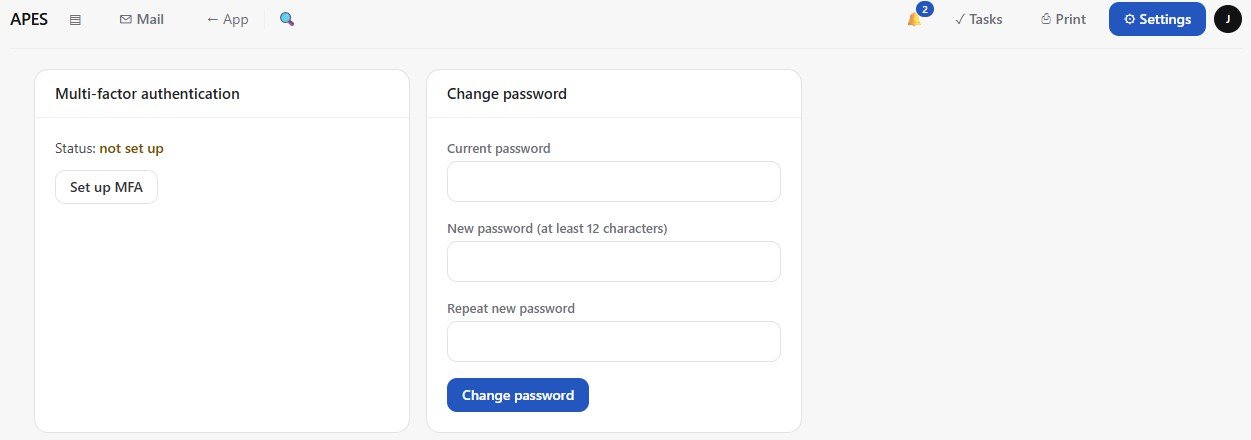
APES supports multi factor authentication directly, so signing in can require a second proof beyond the password itself. This is not an awkward add on. It sits in the same security settings a person already visits to manage their password and their active sessions, and a business can require it for specific roles rather than forcing it uniformly on everyone from day one.
Multi factor authentication sits right next to the password field, in the same settings a person already visits.
Every action is provable, not just logged
Plenty of systems keep some kind of log. Fewer systems can actually prove that log has not been quietly altered after the fact. If a business ever needs to show, with confidence, exactly what happened on a certain date, a log that could theoretically have been edited is not much comfort.
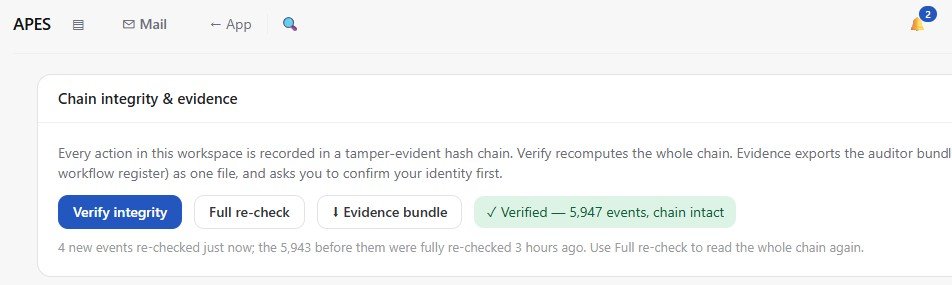
APES records every action in a tamper evident chain, where each entry is cryptographically tied to the one before it. If anyone tried to alter a past entry, the chain itself would no longer verify. A business can run this check at any time and see a clear result confirming the chain is intact, across every recorded event since the workspace began.
The chain integrity check, confirming every one of 5,947 recorded events is intact and unaltered.
Sensitive information stays hidden from anyone who should not see it
Not every field in a business belongs to everyone in the business. A salary figure, a national identification number, or a bank account detail should not be visible just because someone happens to have general access to that collection. Most simple tools do not make this distinction at all. A person either sees the whole record or they see nothing.
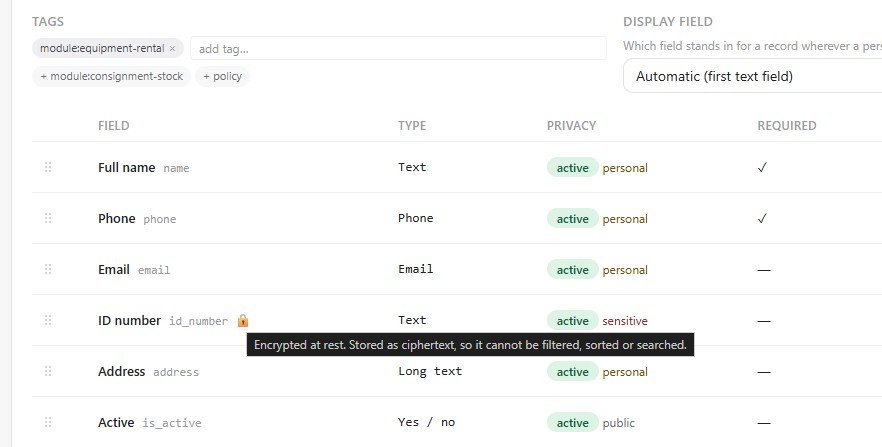
In APES, individual fields can be marked as sensitive, and the platform masks them automatically for anyone without the specific permission to view that kind of data. This is set once, at the field level, and applies everywhere that field shows up afterward, in a table, in a form, or in a report, without anyone needing to remember to hide it manually each time.
The ID number field is marked sensitive, and hovering over the lock shows it is also encrypted at rest, stored as ciphertext so it cannot even be filtered or searched.
A password policy is enforced, not just suggested
Writing a password policy in an employee handbook accomplishes very little if the software itself does not actually check anything. Someone will always choose the shortest password the system technically allows, because there is no real cost to doing so.
APES lets a business set an organization wide security policy that the platform actually enforces, covering things like minimum password length, how many character types are required, whether a password has ever appeared in a known data breach, and how quickly an account locks after repeated failed attempts. None of this depends on anyone remembering to follow a rule written down somewhere else. The system checks it on every attempt, automatically.
Every session can be seen and shut down immediately
A account that was signed in on a shared computer two years ago, and never signed out, is a real and common risk. Most people have no idea how many devices are still holding an active session under their name, because most tools never show them.
In APES, every person can see their own list of active sessions, including the device, the browser, and roughly when it started, and can end any of them immediately, including all of them at once if something feels wrong. Changing a password can also be set to automatically sign out every other session on its own, so a compromised account does not stay reachable just because the password was changed a little too late.
Security that shows up where the work happens
None of this is security as a separate, locked away control panel that only an administrator ever opens. Multi factor authentication sits next to the password field a person already visits. Masked fields appear automatically in the same table everyone already works from. The audit trail lives right next to the records it describes. A business does not have to go looking for its own security. It is simply part of how APES already works, visible in the same screens people use every day.