Every post in this series has looked at one piece of APES on its own. A node type. A security rule. A role. This post is different. It follows one real module from start to finish. The module was designed and built through the platform's own building process. This post shows what those separate pieces look like once they are put together.
This module was built fresh for this post. It was not reused from anything running internally already. It sits in an industry this series has not covered yet, equipment rental. A business that rents out physical equipment has a genuinely different problem from the stock examples used earlier in this series. Testing that difference felt more honest than repeating the same pattern with new labels.
It is worth being exact about what this post actually represents. The module described here was composed piece by piece. It was checked against every real rule the platform enforces. That happens before a proposal is ever put in front of a person to review. Every number in this post comes from that real, checked build. None of it is a rough estimate.
The module is called Equipment Rental & Checkout.
The Problem This Module Actually Solves
Renting out equipment sounds simple until you actually have to run it. A business owns a limited number of physical items. Each individual item has its own condition. It has its own history. It has its own current location. A customer books something for a set of dates. Someone hands it over. Someone eventually gets it back. A lot can go wrong in between.
An item can come back damaged. It can come back late. It can need repair before it goes out again. None of that shows up if you only track how many units of a product are in stock. What matters here is a specific, individual piece of equipment, not a number on a shelf.
Individually Serialized Units, Not Just a Quantity
The first real design decision in this module is also the clearest one. Equipment is not modelled as a product with a quantity on hand. Each physical item is its own record. It carries its own status. It can be available, checked out, under repair, or retired.
The business always knows exactly which unit is where. It is not just counting how many units of that type exist somewhere. When a customer books a rental, they are not reserving a number. They are reserving one specific item. Everything that happens next, the checkout, the return, the damage history, attaches to that same record.
Starting With the Shape of the Data
The module is built from thirteen collections. A small set of them are reference collections. Equipment categories. Locations. A rate card. These describe the vocabulary the rest of the module runs on.
Customers get their own collection. The equipment catalogue holds the individually tracked items described above. A rental agreement describes what a customer actually booked. It has its own line collection underneath it, listing which items and which dates.
Two collections record what actually happened physically. A checkout record captures an item leaving. A return record captures it coming back. Each one notes the item's condition at that exact moment.
A damage charge collection and an approval policy collection handle what happens when something comes back damaged. A maintenance record collection tracks items pulled out of the rental pool for repair. An overdue flag collection exists purely to catch rentals that were never returned on time.
Twelve relations connect all of this together. A rental line ties to the specific equipment item it books. A checkout and a return tie back to that same line. A damage charge ties back to whichever return actually raised it.
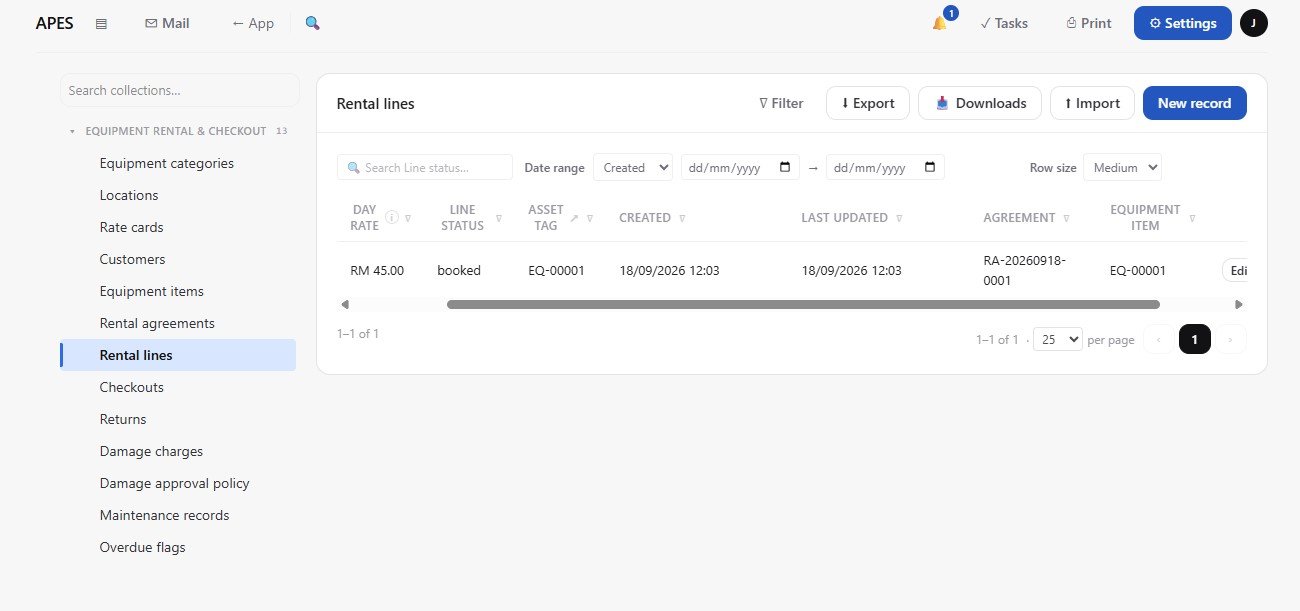
A complete real booking, from two equipment items down to one confirmed rental line. The drill is booked at RM 45 a day under agreement RA‑20260918‑0001, with its own auto‑generated reference, tied to a real customer and location, exactly the header and line pattern the design describes.
Checkout and Return: Where Condition Actually Gets Recorded
The moment an item physically leaves the business, that gets captured as its own record. It is a checkout, and it notes the item's condition at that exact point in time. It is not assumed from whatever the item's last known state was.
The same thing happens in reverse when the item comes back. That is a return record, with its own condition note. It is taken independently of the checkout record. It does not simply overwrite it.
Keeping these as two separate records matters. If there is ever a dispute about condition, there are two independent, timestamped accounts to compare. There is not one field that quietly changed.
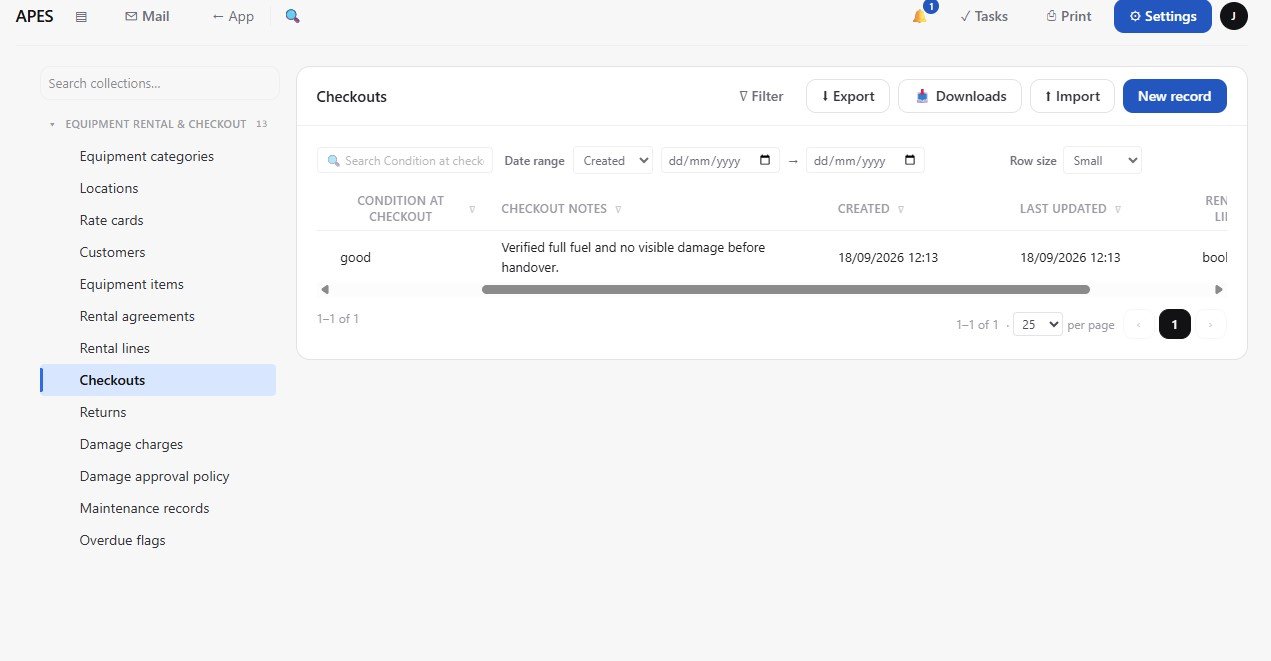
A checkout record created in the Equipment Rental module, linked to the rental line, with the item condition recorded as good at handover and a checkout note captured directly on the record.
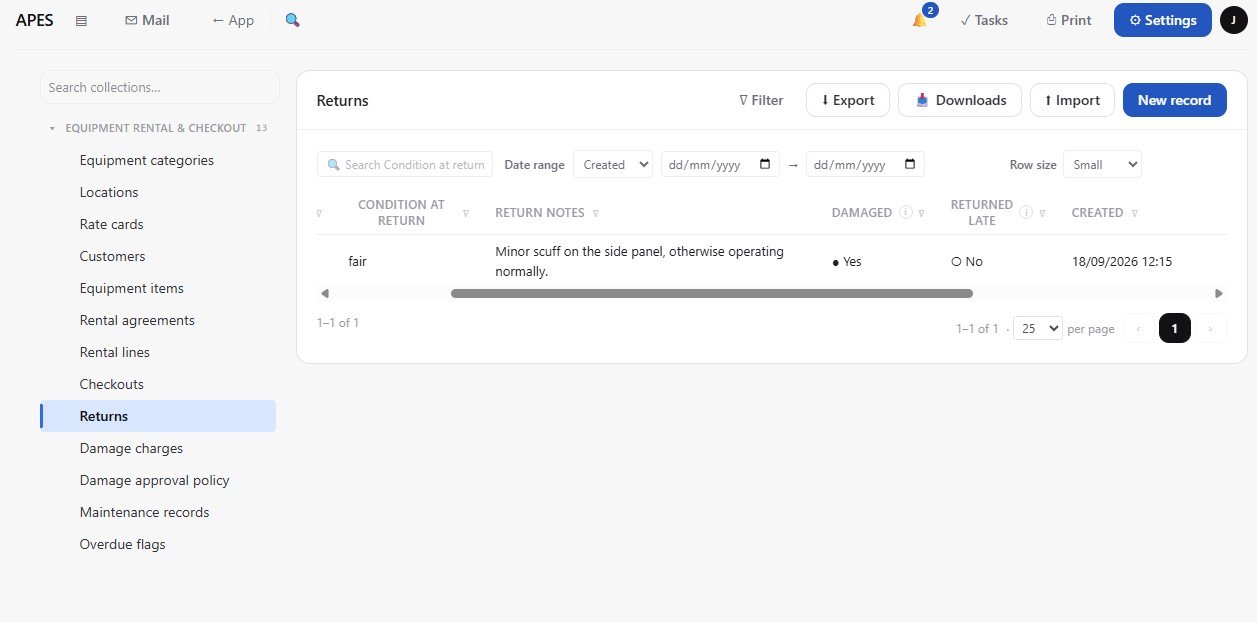
A return record showing the equipment came back in fair condition with a minor scuff noted. The damaged flag is set to yes, which is the field that downstream approval and charge steps key off.
When Something Comes Back Damaged
If a return is marked as damaged, the module does not just create a charge and send it to the customer. It creates a damage charge record. That record moves through an approval workflow.
This is where one of the more thoughtful parts of the design sits. A separate approval policy record holds a threshold amount. That single number decides how much oversight a damage charge actually needs. Below the threshold, the clerk who inspected the return can finalise it on their own judgement. Above it, a manager has to weigh in first.
What matters here is where that threshold lives. It is not written into the workflow itself. It is a row of data the business can change on its own. The business does not need the workflow rebuilt every time its policy shifts. The rule stays fixed, damage above a threshold needs a second person. The number behind it does not.
That split sounds small. It decides whether a business has to call a developer every time it wants to adjust a policy, or whether it can just edit a number itself.
Catching Rentals That Were Never Brought Back
The module also watches for rentals that simply never came back. A workflow is tied to each rental's due date. It fires automatically the day after that date passes, if no return has been recorded yet. It then raises an overdue flag.
Nobody has to remember to check a list of due dates by hand. The system notices on its own, the same day it becomes true.
A Small Repair Lifecycle
Equipment that comes back damaged does not just sit in limbo. Neither does equipment that simply needs routine upkeep. A maintenance record tracks an item while it is out of service. A short workflow sends it for repair. A separate step marks it complete once it is actually fit to rent again.
Only once that maintenance record closes does the item's status change back to available. This stops a damaged item from being booked out again before it has actually been fixed.
Making the Data Usable by an Actual Person
Six computed fields sit on top of the thirteen collections. Some are simple lookups. Others are rollups that summarise related records. One pulls an item's current status straight onto a rental line. Another totals how many times a given piece of equipment has gone out.
None of this changes whether the data is correct. It exists so a person looking at a record does not have to go digging through other collections to understand what they are looking at.
Turning It Into Something a Person Actually Uses
The module ships six pages. Together they hold thirty six individual blocks. There is an overview dashboard. There is the equipment catalogue itself. There is a page for active rentals, another for day to day operations, and another for customers and locations.
A separate page exists just for approvals and policy. This is where a manager sees what is waiting on them. It is also where they can adjust the damage threshold described earlier.
Six forms handle the actual data entry. Booking a rental. Checking an item out. Recording a return. Three detail pages give a fuller, single record view for the pieces of data complex enough to need one.
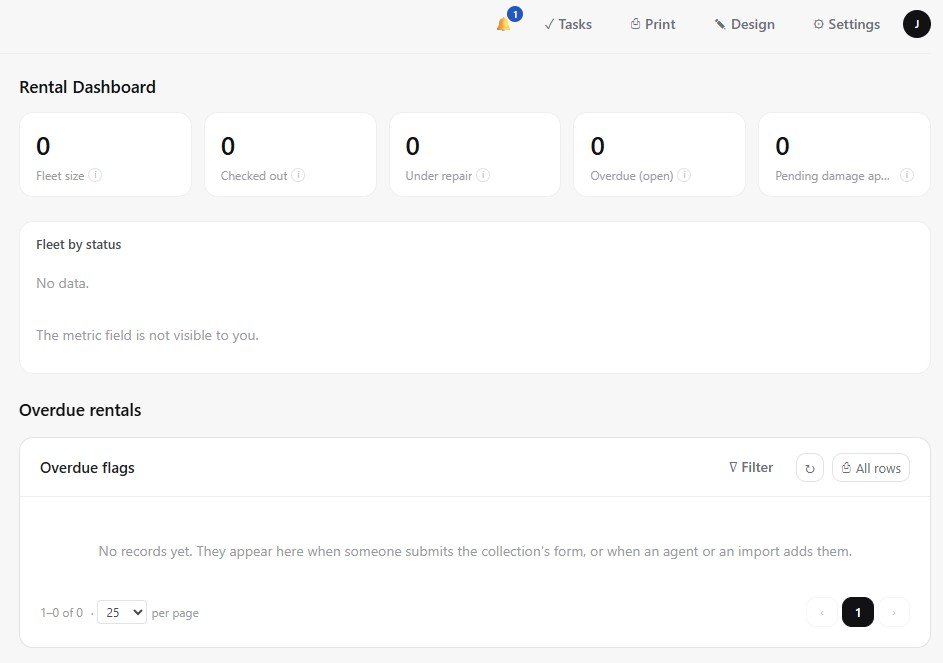
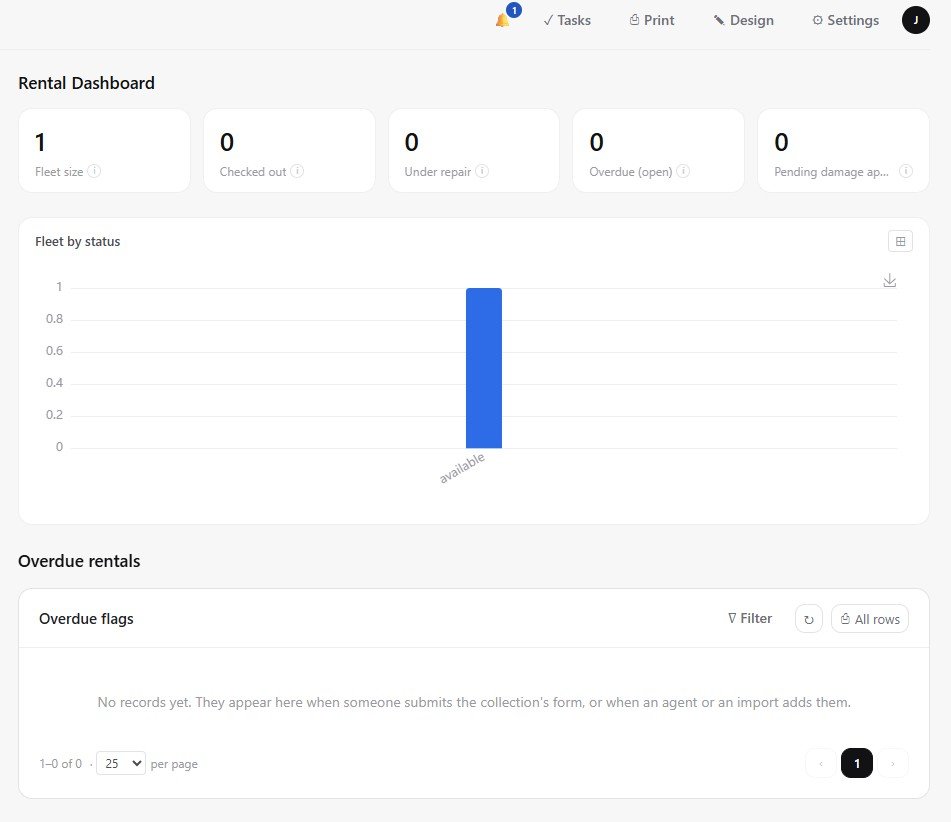
The Rental Dashboard.
The same dashboard, seconds after adding one equipment item. Fleet size updates to 1 and the status chart draws itself automatically, both computed live from the equipment items collection rather than hand maintained.
Who Actually Touches This
Two roles were built for this module. A rental clerk. A rental manager. They map directly onto the two levels of decision already described in the damage approval process.
A clerk runs the day to day work. They check items out. They record returns. They assess straightforward damage on their own. A manager only gets pulled in when the approval policy's threshold says the decision needs a second person.
Nobody has standing access beyond what their job actually requires. That is the same principle covered in the roles and permissions post earlier in this series.
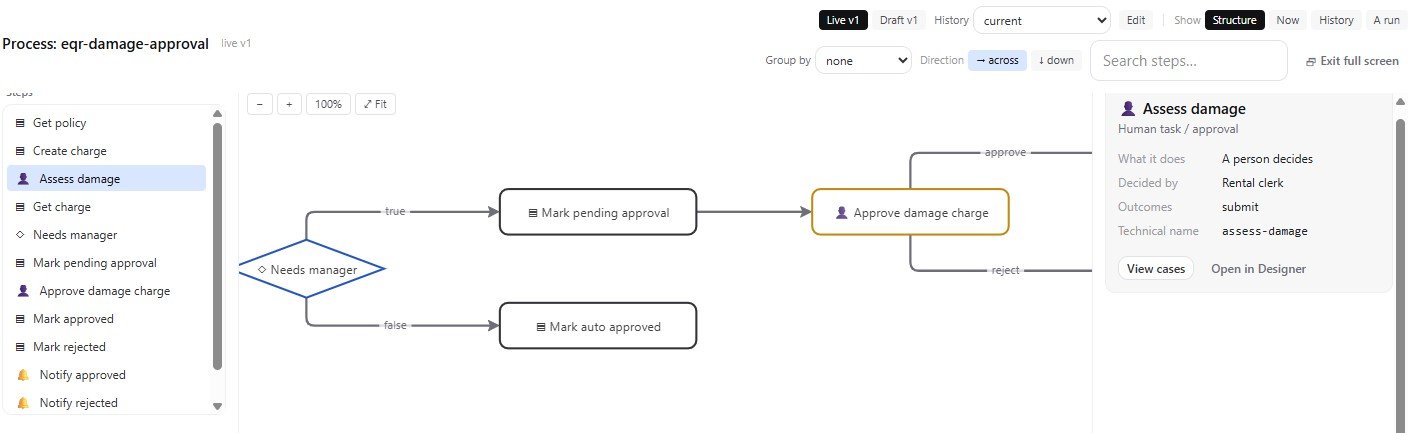
The visual canvas behind the damage approval workflow. After a damage charge is created, the flow checks the estimated amount against the policy threshold and branches automatically, sending only the charges that need a manager's eyes into the pending approval path.
An Honest Design Choice Worth Naming
One detail deserves its own mention. Whether a return counts as late could have been computed automatically. The platform could have simply compared the return date against the due date.
Instead, it is recorded as a checkbox. The inspecting clerk confirms it themselves at the moment of return. That was a deliberate choice. Relying on an unverified assumption about how the platform resolves the current date felt like an unnecessary risk for one field. A clerk confirming it directly is simple. It is also reliably correct.
It is a small, boring decision. It is also exactly the kind of thing that separates a module built carefully from one built quickly.
What This Actually Took
The finished module has thirteen collections. It has twelve relations and six computed fields. Fifty nine fields are stored across those collections in total.
It has six forms and three detail pages. It has six pages, built from thirty six blocks between them. It has six workflows, built from thirty nodes between them. It has two roles.
Every one of those numbers was checked against the platform's own real rules. That includes the doctrine checks. It includes the manifest checks. It includes the workflow shape checks. All of that happened before the module ever reached the point where a person would review it.
None of it needed custom backend code. None of it needed a hand built permissions system. None of it needed a database schema designed from scratch. All of that came from the platform itself.
What took real thought was the part that was always going to be specific to this business. How condition should be captured. What should happen when something comes back damaged. How a repair should be tracked until an item is genuinely fit to rent again.
Closing This Series
This series started by explaining what APES actually is. A module built from data. Workflows built from logic on top of it.
It walked through the building blocks a workflow can be made from. It looked at how approvals and notifications actually behave. It covered waiting on outside systems. It explained what the security model does and does not allow. It showed how roles and permission floors keep access matching how a real organisation is shaped. It looked at what APES already connects to outside itself.
This last post is where all of that stops being separate ideas. It becomes one working module. It was designed for one real, awkward business problem. It was checked against the platform's own rules the whole way through. No server was ever provisioned by hand.
That is the actual claim this whole series has been making, one piece at a time. This post is simply where it adds up. It happens to do that in an industry this series had not touched until now.