The Audit Trail: A Complete Record of Every Change
Every business system eventually has to answer the same question about some record. Who changed this. When did it change. What did it look like before. In most systems, answering that question means digging through logs, asking around, or simply admitting that nobody really knows.
APES answers that question by default, on every record, without anyone having to turn a setting on. It is called the audit trail, and it is one of those features that feels unremarkable right up until the moment you actually need it, and then it becomes the most important thing on the screen.
What the audit trail actually shows
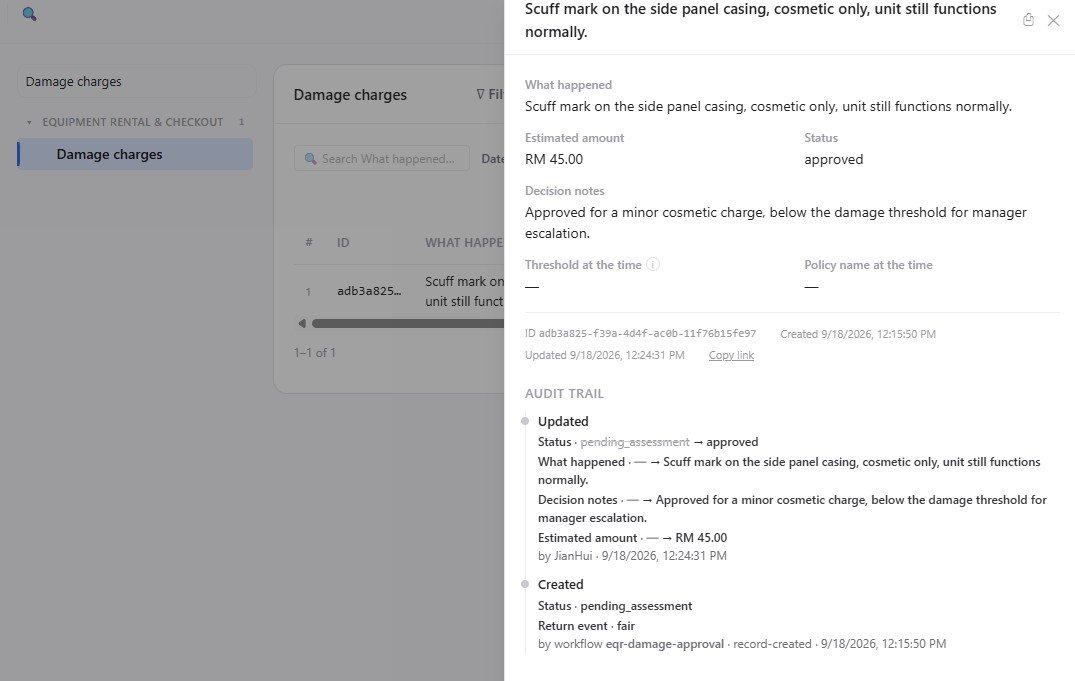
Open any record in APES and you will find a section that lists its history from the moment it was created. Each entry shows what happened, which fields were involved, and who did it. If a person made the change through the normal interface, their name is right there. If the change came from an import, the audit trail says so.
This is not a vague summary. It shows the actual field names and the actual values involved. If a status field moved from pending to approved, the audit trail records that specific transition, not just a generic note that something was updated.
The part that matters most: workflows leave their own signature
The most useful detail in the audit trail is not what happens when a person edits a record by hand. It is what happens when a workflow does it instead.
When a workflow creates or updates a record automatically, the audit trail names the workflow by its own name. It does not just say the change happened, it says which workflow made it happen, and what condition triggered that workflow in the first place. A damage charge record created automatically after a return was flagged, for example, shows an entry that names the workflow directly and explains what event caused it to run.
This matters because automation without a trail is automation nobody can fully trust. If a workflow silently changes a record and nothing marks that it happened, the record's history has a gap in it, and gaps are exactly where confusion and disputes start. APES closes that gap by treating a workflow's actions the same way it treats a person's actions, fully recorded, fully attributed, fully visible later.
Why this beats a generic activity log
Some systems have an activity log that is separate from the record itself, tucked away in a different screen that most people never open. APES keeps the audit trail attached directly to the record it describes. Open the record, and its history is right there, not somewhere else you have to remember to check.
This also means the audit trail travels with the record wherever it is viewed. A manager looking at a rental agreement does not need special permission to a separate logging system to see how that agreement got to its current state. The history is part of the record, the same way its fields are.
A trail you can actually use, not just store
An audit trail that nobody reads is not much better than no audit trail at all. The value comes from being able to answer a real question quickly, not from having data buried somewhere for compliance purposes only.
Picture a dispute over a damage charge. Without an audit trail, resolving it means asking around and hoping someone remembers the sequence of events correctly. With one, the answer is already sitting on the record. It shows the return that triggered the charge, the workflow that created it, the amount that was assessed, and the person who approved or rejected it, each entry with its own timestamp.
Picture a question about why a field suddenly shows a different value than expected. Instead of guessing, you open the record and see exactly when it changed, what it changed from, and whether a person or a workflow made that change.
What this means for building on APES
For anyone building a module, the audit trail is not something you have to design or turn on. It comes with every collection automatically, the moment records start getting created and changed. There is no extra field to add and no extra logic to write. The platform is already watching every write and recording it in a form a person can actually read later.
This is a quiet kind of reliability. It does not show up as a feature on a marketing page the way a workflow builder or a dashboard chart does. It shows up months later, when someone needs to answer a question about what really happened, and the answer is already there waiting for them.