APES Ends the Email Chase for Approvals
APES replaces the oldest bad habit in business software: sending a request and then hoping someone notices it. A stock adjustment, a sales order, a loan application. Somebody fills it in, sends it, and then waits. If nothing happens, they forward the email again. They tag someone on chat. They walk over to a desk. None of that is the process. It is the gap around the process, and it exists because the request and the decision live in two different systems that were never actually connected.
APES closes that gap by making the request itself the thing that starts the approval. There is no separate step where someone “files” a request and a different step where someone “routes” it to the right approver. The form is the trigger.
The Form You Fill In Is the Request You're Making
When a document form in APES is set to require approval, submitting it does not save a record. It starts a workflow. The header fields and every line item the user entered are carried forward as the payload for that workflow, exactly as they were typed. Nothing is written to the database yet. Nothing exists for anyone else to see except the one thing that matters: a decision is now pending.
This sounds like a small distinction, but it changes what “submitted” means. In an email-based process, submitted just means sent. It says nothing about whether anyone opened it, understood it, or even received it. In APES, submitted means a workflow now exists with a state, a set of people assigned to decide, and a clock running. That state can be looked up by anyone with permission to see it. It does not depend on an inbox.
The Approver Sees the Actual Document, Not a Notification About One
A common failure of email-based approval is that the approver often cannot see what they are approving without leaving the email and going to find the source record. A stock transfer email says “please approve TRF-20260922-0001” and the approver has to open another tab, search for that number, and cross-check the details by hand before they can make a decision with any confidence.
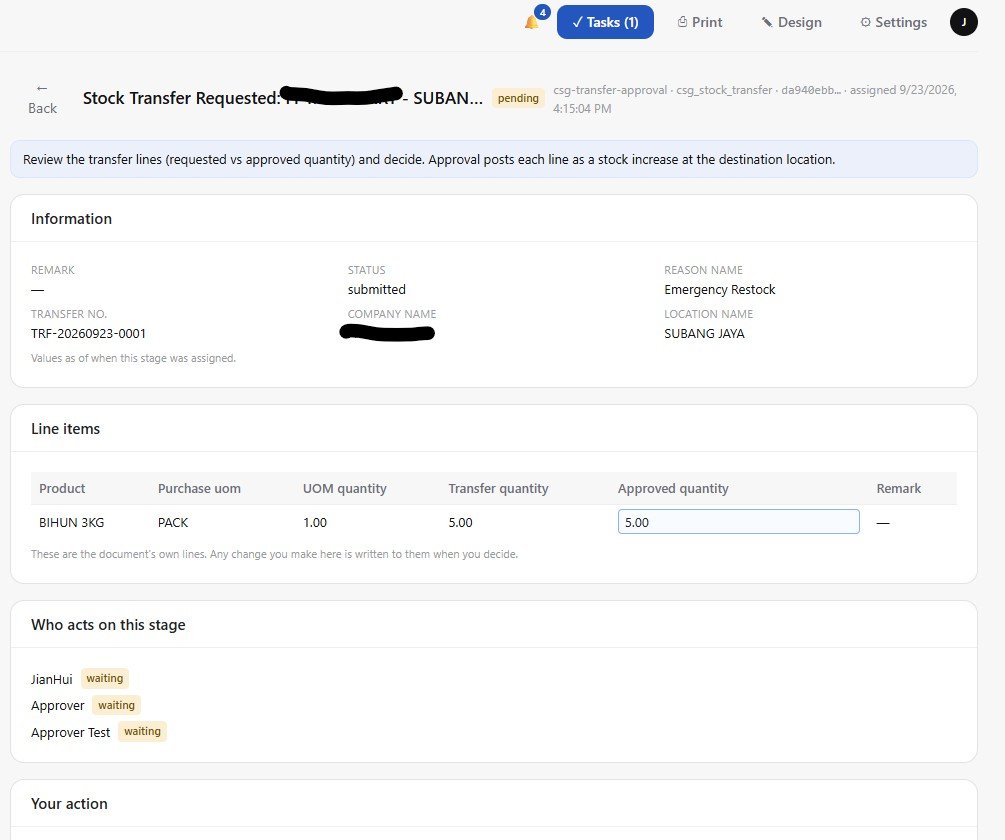
APES does not let this happen, because the approval task and the document are the same object. The approver opens their task and sees the full submitted document. Header fields in the order the form put them in. Every line item in a table, with its quantity, its unit, its amount. This is not a summary and it is not a link. It is the same document view the person who submitted it saw, rendered read only, right inside the decision itself. There is no second tab to open and no chance of approving a version of the request that does not match what was actually sent.
For some fields, the approver can also correct a typo in a header field before approving, and that correction is recorded as part of the decision, not slipped in unnoticed afterward.
Approvals Can Have More Than One Step, and More Than One Path
Not every request needs the same level of scrutiny. A small stock adjustment might only need one person's sign-off. A larger one might need two. APES lets a workflow chain several approval steps in sequence, and lets each step decide differently. One approver, any one of several approvers, every approver on the list, or a minimum number out of a group. A step can also require the approvers to act in a specific order rather than whichever one gets to it first.
Because this routing lives inside a workflow rather than inside someone's memory of “who normally handles this,” it does not depend on a particular person knowing the informal rule. A transaction over a certain amount can be routed to a more senior approver automatically. A different transaction type can skip straight to a different reviewer. The routing is part of the system, not part of someone's job knowledge that walks out the door when they change roles.
Every Step Is Timestamped, Not Remembered
Open a completed approval in APES and the record does not stop at “approved.” It shows a timeline. When the request was submitted. When it was decided, and by whom. How long the decision actually took, measured from submission to completion. On a real transfer request in this workspace, that timeline reads Submitted, a named decision event, then Completed, with the total time stamped right there. Twenty three minutes, in this case.
This matters more than it sounds like it should, because “how long does approval usually take” is a question most businesses can only answer by guessing. In APES it is not a guess. It is a fact sitting on every request, and because every request has the same shape, those facts can be looked at across the whole business, not just one instance at a time.
Each approval also carries its own conversation thread, visible to the submitter and every assignee on that specific request. A question about a line item does not need a separate email chain or a chat message that will be impossible to find again in three weeks. It sits attached to the exact request it is about, permanently.
The Submitter Can Track It Too, Without Asking Anyone
The other half of the email problem is the person who submitted the request. In an email process, once they hit send, they have no visibility at all. They do not know if it was seen. They do not know where it is stuck. Their only tool is to ask again.
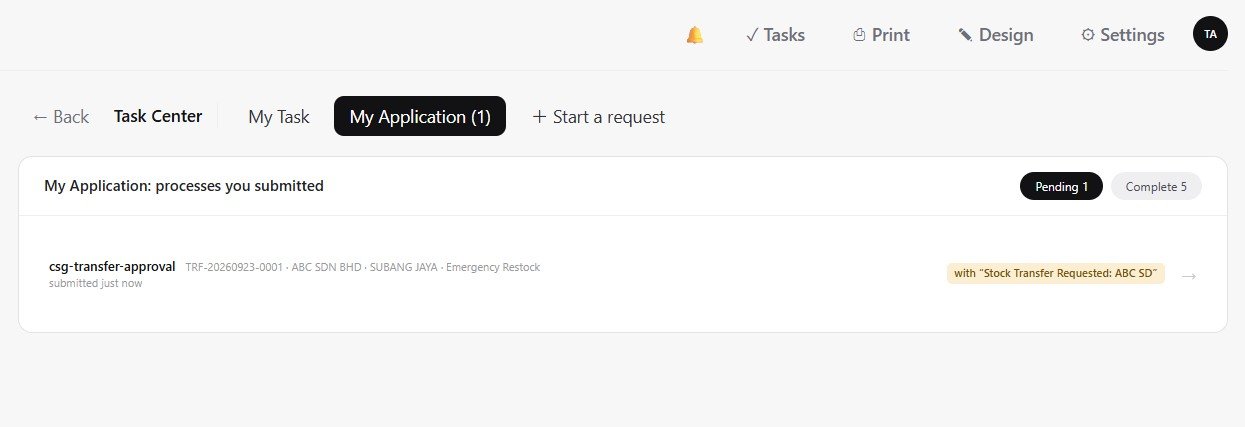
APES gives the submitter their own view of every request they have made, split into what is still pending and what has already been completed. They can open any of them and see the same timeline the approver sees. They do not need to ask a colleague to check on their behalf, and they do not need to guess whether a lack of reply means no or means not yet.
Nothing Is Written Until Someone Actually Approves It
The strongest guarantee in this design is also the simplest one to state. Until an approval workflow finishes with an approve outcome, the record it describes does not exist in the database. Not as a draft, not as a pending row, not as anything a report could accidentally pick up. If the request is declined, nothing is deleted, because there was never anything to delete. The workflow run itself is the complete record of what happened and why.
This removes an entire category of mistake that email-based approval cannot avoid. A half-approved spreadsheet row. A record that got created and then had to be manually reversed after a rejection. A “temporary” entry that someone forgot to clean up. In APES, a declined request simply never became data. The evidence that it was requested and declined still exists, permanently, in the task's history. It is just never confused with something that actually happened.
Why This Is the Part That Compounds
A single approval, done once, is not where this pays off. It pays off on the two hundredth one, when nobody has re-explained the process to a new hire, when nobody is quietly working from a slightly different understanding of who approves what, and when a manager can answer “how are we doing on approvals this month” by looking at a screen instead of asking around. The chain that used to live in people's inboxes now lives in the system that actually did the work, and it stays there.