Walk into almost any growing factory and you will hear two acronyms used as if they were interchangeable. The finance team says the company needs a better ERP. The plant manager says what they really need is an MES. A consultant suggests both. The vendors, naturally, each say their system does most of what the other one does.
It is easy to see why directors find the subject confusing. Both systems deal with production orders. Both talk about inventory, scheduling, quality and cost. Both promise visibility. But they were designed to answer very different questions, for different people, on very different timescales.
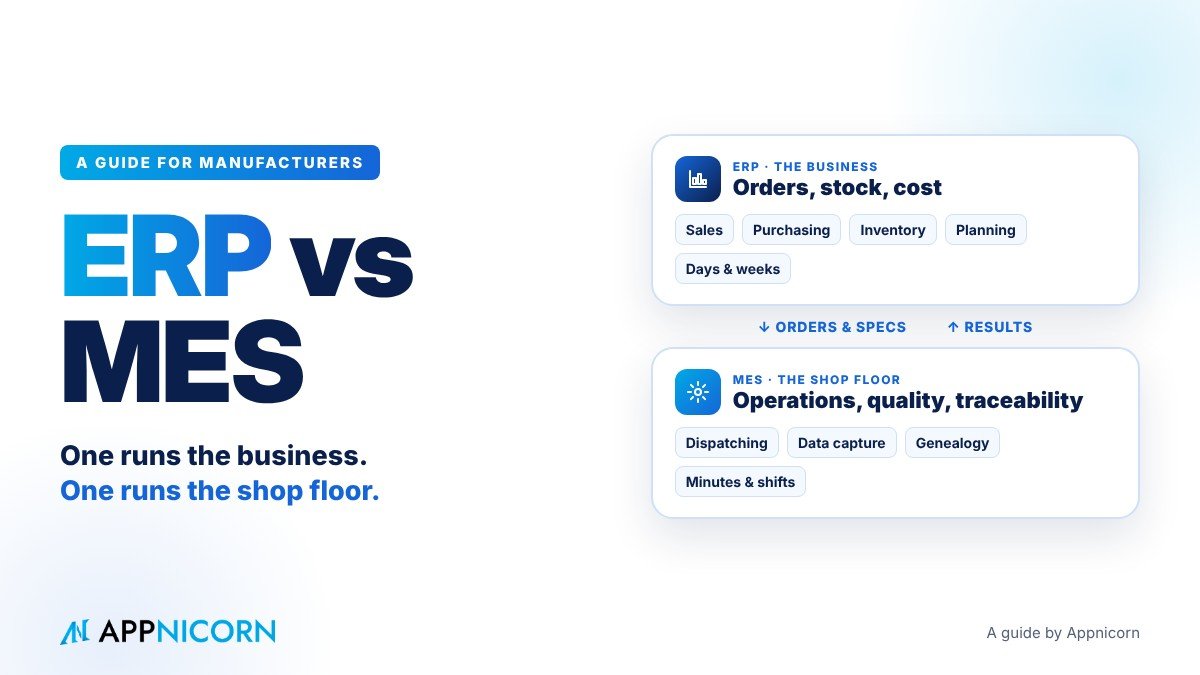
Put simply, an ERP runs the business and an MES runs the shop floor. The ERP decides what the company should make, buy and sell, and tells you afterwards whether it made money. The MES makes sure that what was planned is actually made, correctly, and records exactly how it was made, minute by minute.
This guide explains each system in plain language, shows where they sit in a factory's systems, compares them side by side, follows one production order from start to finish, and looks at where they overlap and how they connect. It ends with practical advice on which problems to solve first, because for many manufacturers the honest answer is not "buy both", but "fix the right gap".
What an ERP is
ERP stands for enterprise resource planning. An ERP is the system a company uses to run its core business processes in one place, with one set of records, so that sales, purchasing, stock, production planning and finance all work from the same information.
In a manufacturing business, an ERP typically handles:
Sales and orders. Quotations, sales orders, delivery dates, pricing and customer credit.
Purchasing. Purchase requests, approvals, purchase orders, supplier deliveries and invoices.
Inventory. Stock levels of raw materials, components and finished goods across stores and warehouses.
Production planning. Turning demand into production orders, using bills of materials (what goes into a product) and routings (the steps to make it), and working out what materials are needed and when.
Costing. The planned cost of each product and, after production, the actual cost.
Finance. Invoicing, receivables, payables and the books, often through a connected accounting system.
The ERP's natural unit of work is the order: a sales order, a purchase order, a production order. Its natural timescale is days and weeks. Its users are mostly in the office: sales, purchasing, planners, store keepers, finance and management. And the questions it answers are business questions. What have we promised our customers? What do we need to buy? How much stock do we have? Are we making money on this product?
What an ERP does not usually do well is follow what happens inside the factory once a production order is released. As far as many ERPs are concerned, a production order is "released" one day and "completed" a few days later. What happened in between, on which machine, by which operator, with which batch of material, at what speed and with how much scrap, is often invisible.
What an MES is
MES stands for manufacturing execution system. An MES is the system that manages and records production as it happens on the shop floor. Where the ERP says "make 5,000 units of product A by Friday", the MES manages how those 5,000 units are actually made.
Industry bodies have long described the typical functions of an MES. In plain terms, they include:
Dispatching and detailed scheduling. Sequencing jobs on specific machines and lines, shift by shift, based on what is actually available right now.
Work instructions. Showing operators the correct instructions, settings and specifications for the job in front of them.
Data collection. Capturing quantities produced, scrap, downtime, cycle times and process parameters, either from operators or directly from machines.
Material tracking and genealogy. Recording which batches of material went into which batch of product, so that any finished item can be traced back to its ingredients or components, and forwards to the customers who received it.
Quality management in process. Running in-process checks, recording results, and stopping or holding production when results are out of specification.
Labour tracking. Recording who worked on which job and for how long, and whether they were qualified to do it.
Performance analysis. Measuring how well equipment and lines are performing, including measures such as overall equipment effectiveness (OEE).
Maintenance coordination. Linking machine condition and breakdowns to maintenance activity.
The MES's natural unit of work is the operation: one step of one job on one machine. Its natural timescale is seconds, minutes and shifts. Its users are mostly on the floor: operators, supervisors, quality inspectors, process engineers and maintenance technicians. And the questions it answers are execution questions. What is running on line 3 right now? Why did it stop? Is this batch within specification? Which lot of resin went into this pallet?
Where each system sits: the factory systems picture
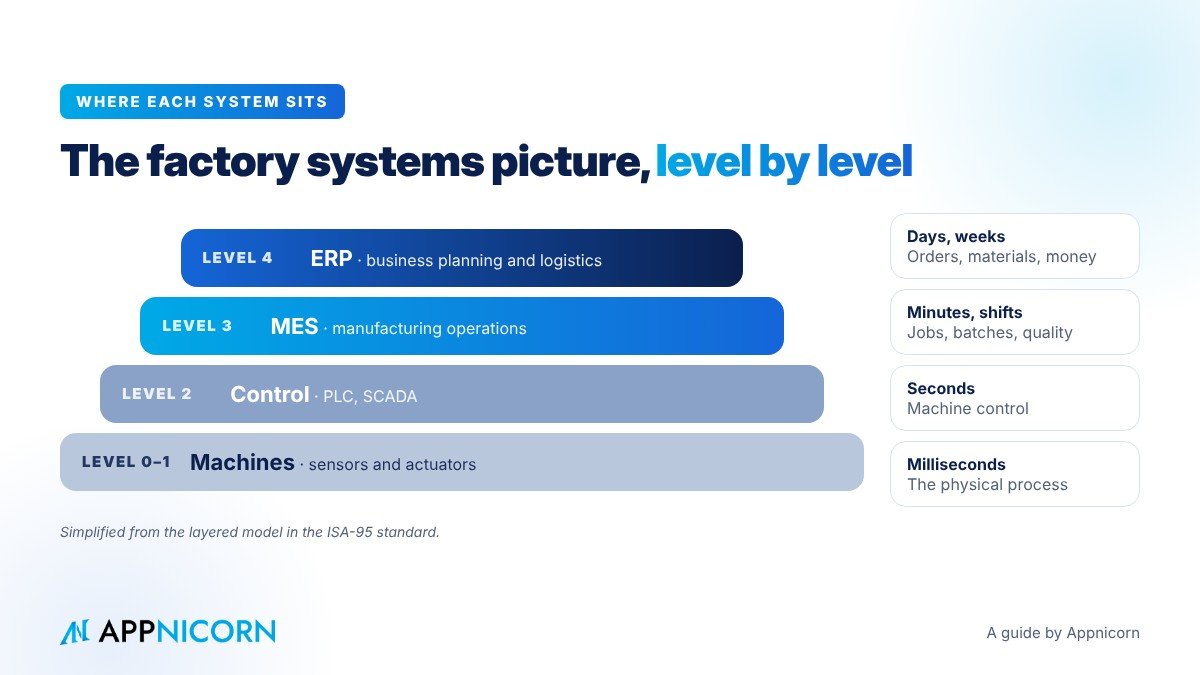
A useful way to see the difference is the layered model that many manufacturers and system integrators use, based on the international ISA-95 standard for connecting business and manufacturing systems. It describes a factory's systems as levels.
Level 0 and 1: the physical process. The machines themselves, with their sensors and actuators.
Level 2: control. The systems that control and supervise machines directly, such as PLCs (programmable logic controllers) and SCADA (supervisory control and data acquisition). These work in milliseconds and seconds.
Level 3: manufacturing operations. This is where the MES lives. It works in minutes, hours and shifts, and manages the flow of work through the plant.
Level 4: business planning and logistics. This is where the ERP lives. It works in days, weeks and months, and manages orders, materials, people and money across the business.
The model makes one thing very clear. ERP and MES are not competitors for the same job. They are neighbours. Each needs information from the other, and most of the trouble in factories happens in the gap between them.
ERP vs MES, side by side
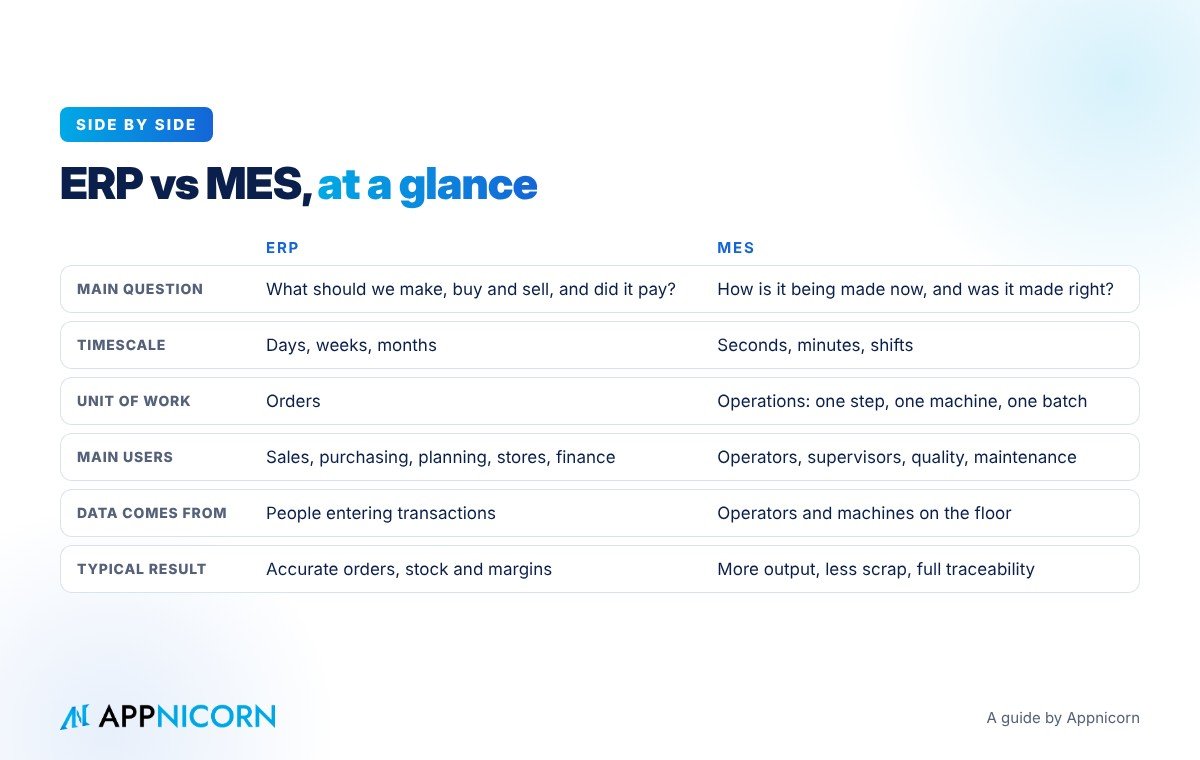
Here is how the two systems compare on the points that matter most to management.
| ERP | MES | |
|---|---|---|
| Main question | What should we make, buy and sell, and did it pay? | How is it being made right now, and was it made right? |
| Timescale | Days, weeks, months | Seconds, minutes, shifts |
| Unit of work | Orders (sales, purchase, production) | Operations (one step, one machine, one batch) |
| Main users | Sales, purchasing, planning, stores, finance, management | Operators, supervisors, quality, engineering, maintenance |
| Where data comes from | People entering transactions in the office | Operators on the floor and machines directly |
| Planning | Production orders, material requirements, capacity at a high level | Detailed sequencing by machine, shift and crew |
| Inventory | Stock by item and location, valued in money | Material at the line, consumed by batch, with genealogy |
| Quality | Supplier and customer quality records, holds on stock | In-process checks, specifications, holds on the line |
| Cost | Standard and actual cost by order and product | Actual time, scrap and consumption that drive the actual cost |
| Typical result | Accurate orders, purchasing, stock and margins | Higher output, less scrap, full traceability |
A simple way to remember it: the ERP tells the factory what to do, and the MES tells the business what actually happened.
Following one production order from start to finish
Comparisons are useful, but the clearest way to understand the two systems is to follow a single order through a factory that has both. Imagine a plastics manufacturer receiving an order for 20,000 moulded containers from a food company.
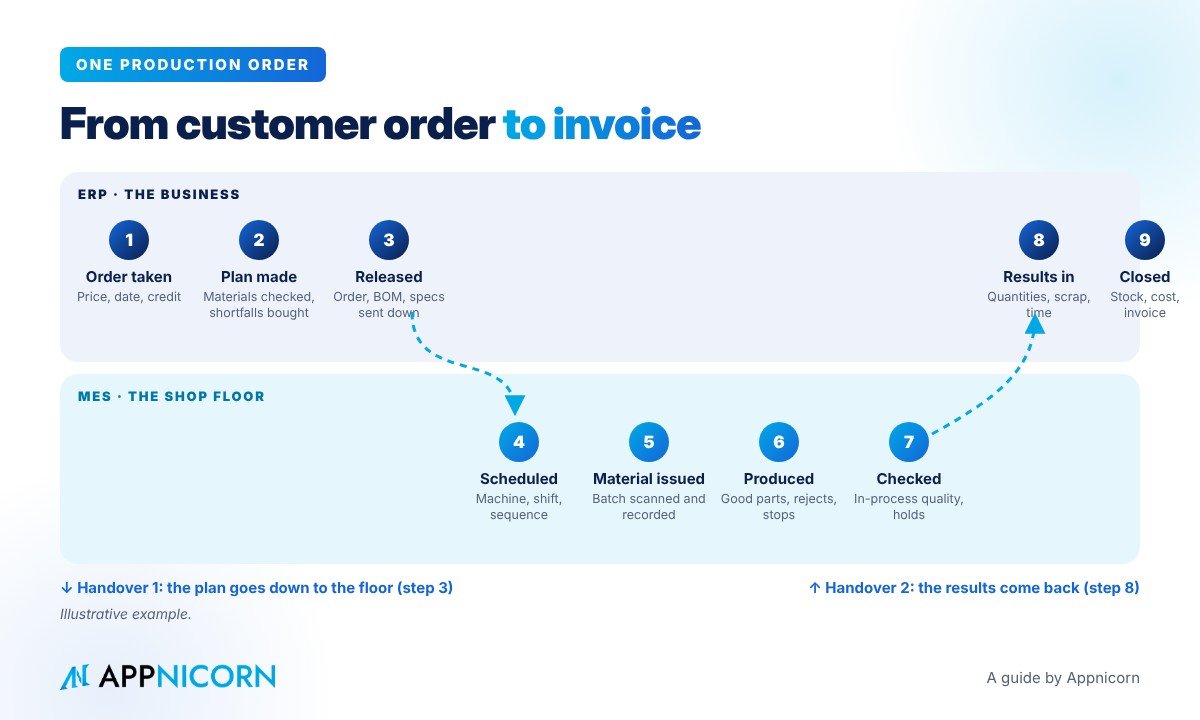
1. The order is taken (ERP). Sales enters the order with the customer's price, quantity and delivery date. The ERP checks the customer's credit and confirms the order.
2. The plan is made (ERP). The planner creates a production order. Using the bill of materials, the ERP works out how much resin, colourant and packaging is needed, checks stock, and raises purchase requests for anything that is short.
3. The order is released to the floor (ERP to MES). The production order, with its quantity, due date, bill of materials, routing and specifications, is sent to the MES.
4. The job is scheduled in detail (MES). The MES sequences the job on a specific moulding machine for the night shift, taking into account which moulds are available, which machines are down for maintenance and which jobs are already running.
5. Material is issued and recorded (MES). The operator scans the resin batch at the machine. The MES checks that it is the right material and records the batch number against the job.
6. Production runs (MES). The operator follows the work instructions for the mould and settings. The MES counts good parts and rejects, and records every stop and its reason.
7. Quality is checked in process (MES). Every hour, a quality inspector measures sample containers. When one measurement drifts out of specification, the MES flags it, the supervisor adjusts the process, and the affected parts are held for review.
8. Results go back to the business (MES to ERP). At the end of the job, the MES reports the good quantity, scrap, actual material consumed, machine time and labour time back to the ERP.
9. The business closes the loop (ERP). The ERP updates finished goods stock, calculates the actual cost of the order, compares it with the planned cost, arranges delivery and raises the invoice.
Notice where the handovers are: at step 3, when the plan goes down to the floor, and at step 8, when the results come back up. In a factory with only an ERP, steps 4 to 7 usually happen on paper, whiteboards and spreadsheets, and step 8 happens when someone keys in a production report, sometimes days later. In a factory with only an MES, steps 1, 2 and 9 happen in disconnected spreadsheets and accounting software. Either way, the gaps are where problems hide.
Where ERP and MES overlap
The confusion between the two systems comes mostly from five areas where they genuinely overlap. In each case, the key is to decide which system is the master for which part of the job.
Scheduling. Both systems schedule, but at different levels of detail. A sensible split is that the ERP owns the "what and when" (which orders, by which date, at a weekly or daily level) and the MES owns the "where and in what sequence" (which machine, which shift, in which order today).
Inventory. The ERP owns stock in stores and warehouses, valued in money. The MES owns material once it is issued to the line, by batch, including what was consumed and what was scrapped. Material should move clearly from one to the other, never sit in both at once.
Quality. The ERP typically owns supplier quality, incoming inspection results, customer complaints and stock holds. The MES owns in-process checks and the decision to hold or release work on the line. Both need to agree on what "on hold" means.
Maintenance. Planned maintenance schedules and spare parts are often managed in the business system, while machine condition, breakdowns and downtime reasons are captured on the floor. Maintenance works best when both sides are connected, so that a breakdown recorded on the line becomes a maintenance job with a clear owner.
Costing. The ERP calculates cost, but the MES provides the real numbers that make the cost accurate: actual time, actual consumption and actual scrap. Without the MES data, actual cost is often a standard cost with a hopeful adjustment.
When companies get into trouble, it is usually because nobody decided these boundaries, and the same information ends up being maintained in two places, slightly differently.
What happens when a factory has only an ERP
Many small and mid-sized manufacturers have some form of business system and nothing on the floor. The symptoms are familiar.
Production orders are printed and travel with the job as paper. Operators write quantities, scrap and stoppages on sheets that are collected at the end of the shift and keyed in later, if at all. Work in progress is a guess: the system says an order was released, but nobody can say exactly how far it has got without walking the floor. Actual costs are estimates. When a customer complains about a product, tracing which material batch went into it can take days of searching through paper. And management finds out about a bad shift the next morning, or at the end of the month.
None of this means the ERP is wrong. It simply cannot see what nobody tells it.
What happens when a factory has only an MES
The opposite situation is less common in smaller companies, but it happens, especially in plants that belong to a larger group or that invested in machine monitoring first.
The floor knows exactly what it is doing. Output, downtime and quality are visible in real time. But the business around the floor still runs on spreadsheets, email and chat. Production plans are built by hand from sales spreadsheets. Material shortages are discovered when the line is waiting. Purchase requests are approved on WhatsApp. Customer credit is checked after goods are made. The factory runs efficiently, sometimes making exactly the wrong thing.
Signs you need more control on the shop floor
You are likely to benefit from MES-type capabilities when:
You cannot say, at any moment, what each line or machine is running and whether it is on track.
You rely on paper travellers and end-of-shift reports, and the numbers arrive late or not at all.
Scrap, rework and downtime are significant, but you cannot reliably say why they happen.
Your customers, or your industry's regulations, require full batch traceability, and producing it takes too long.
Operators need the right instructions and specifications for many product variants, and mistakes happen when they use the wrong ones.
Signs your real gap is in the business processes around the floor
Many manufacturers who think they need an MES are actually struggling with something else: the processes between departments. You are likely to have this gap when:
Production waits for materials because material requests and purchase approvals move slowly through chat and paper.
Changes to products, recipes, specifications or schedules are agreed verbally and not everyone hears about them.
Batches are released to customers without a clear record of who checked and approved them.
Maintenance requests are made by phone and nobody can tell which are open, overdue or repeated.
Quality checks exist on paper, but nobody can show that every check was done in order, by the right person, on every shift.
These are not problems of machine data. They are problems of approvals, handovers, deadlines and records. A full MES project will not fix them, and many factories get far more value, far sooner, by putting these processes under control first.
How ERP and MES connect
When a company does run both systems, the connection between them matters as much as either system on its own. A good integration follows a few principles.
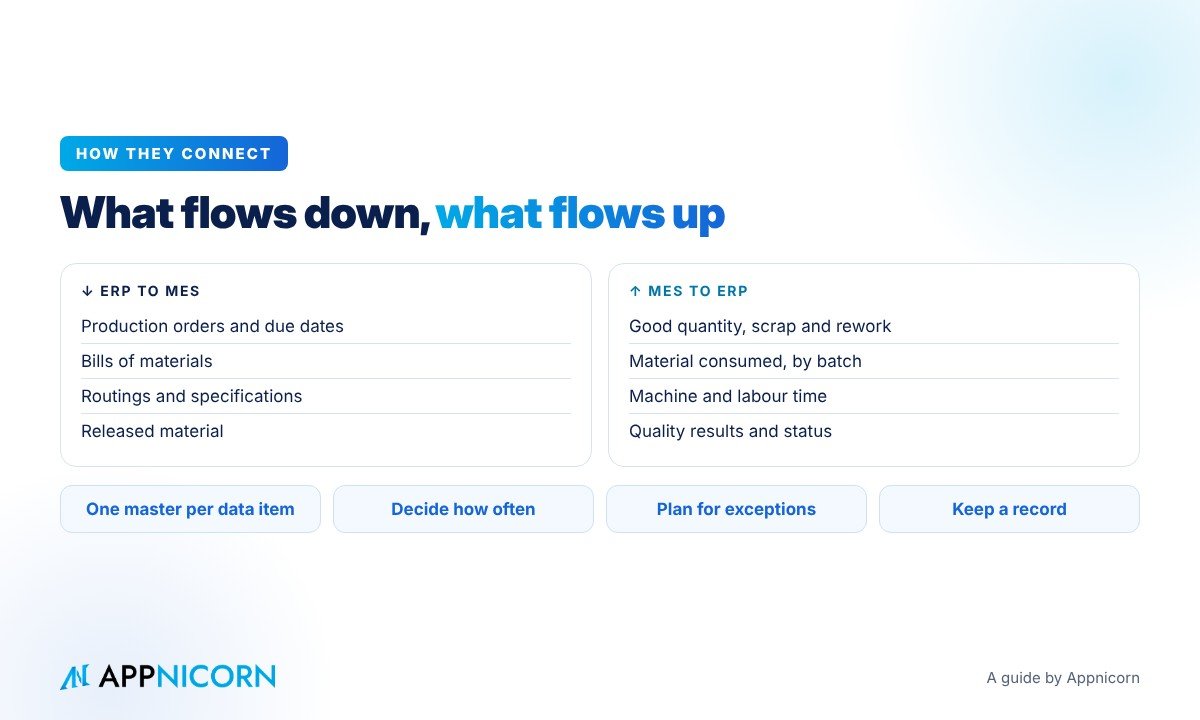
Agree what flows down. Typically: production orders, quantities and due dates, bills of materials, routings, product specifications and released material.
Agree what flows up. Typically: good quantity produced, scrap and rework, actual material consumption by batch, machine and labour time, quality results and order status.
One master for each piece of data. Each item of information, such as a product specification, a bill of materials or a stock balance, should be owned by one system and copied, never edited, in the other.
Decide how often. Not everything needs to be real time. Order releases and completions may be immediate, while summaries of downtime may only need to go up once per shift.
Plan for exceptions. What happens when the MES reports more scrap than planned, or a batch is placed on hold after the ERP has already promised it to a customer? The rules for these situations should be designed up front, with named people to decide.
Keep a record. Every handover between systems should leave a trace, so that when numbers disagree, someone can see what was sent, when, and what happened next.
Common mistakes to avoid
Buying technology before defining the process. If the factory does not agree on how material requests, changes or batch releases should work, a new system will simply digitise the confusion.
Maintaining the same data twice. Product codes, bills of materials and specifications kept separately in both systems will drift apart, and then nobody trusts either.
Trying to automate everything at once. Connecting every machine in the first phase is expensive and slow. Many plants start with operator-entered data on a handful of critical processes and add machine connections later.
Ignoring the people on the floor. Operators and supervisors will only enter accurate data if the system is quick, clear and useful to them, not just to management.
Leaving integration until last. The connection between business and shop floor is where the value is. Design it at the start, not as an afterthought.
Which should you fix first?
There is no single answer, but there is a sensible way to decide. Start with the problem that costs you the most, not with the system that sounds most advanced.
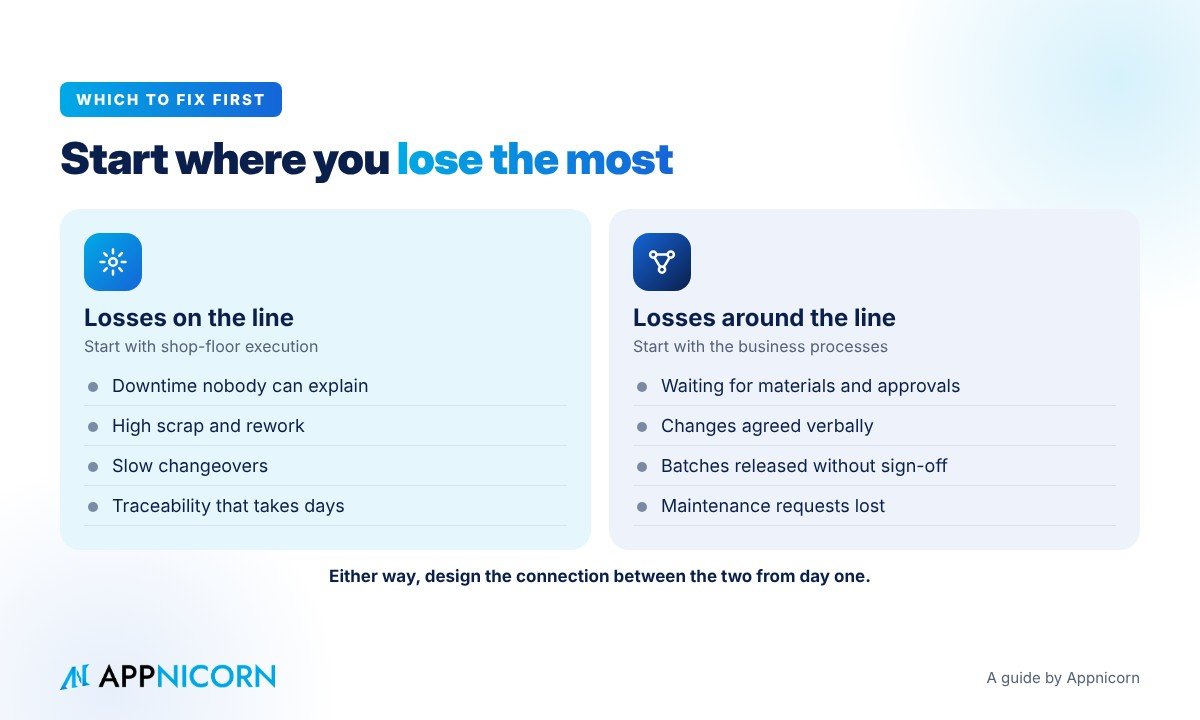
If your biggest losses are on the line, such as downtime, scrap, slow changeovers or traceability that takes days, shop-floor execution is the place to start.
If your biggest losses are around the line, such as waiting for materials, slow approvals, unrecorded changes, unchecked batch releases and late or missing information between departments, then the business processes are the place to start. For many small and mid-sized manufacturers in Malaysia, this is where the quickest and largest gains are, because it is where the most work still runs on paper, spreadsheets and chat groups.
Whichever you start with, design for the connection between the two from day one. Eventually, the business and the floor need to work from the same truth.
Questions to ask before you choose
Before you invest in either system, it is worth answering a few questions as a management team.
Which decisions do we make too late today because the information arrives too late?
Which processes cross departments, and where do they get stuck?
Who owns each key piece of data: product specifications, bills of materials, stock, schedules?
What do our customers and regulators require us to prove, and how long does it take us today?
Which processes do we want to change, and which do we simply want to record better?
How will operators, supervisors and office staff each benefit from the new system?
How will the new system connect to what we already have, including our accounting software and any machine monitoring?
The answers will usually point clearly to where the first project should be.
Let's talk about your factory
Every factory is different. The right balance between business systems, shop-floor systems and the processes that connect them depends on what you make, how you make it and where your biggest losses are today.
If you are working out how ERP, MES and everything in between should fit together in your organisation, we would be glad to talk it through. Appnicorn is a Malaysian IT company with years of experience building business systems, and APES (said "A-pes") is the custom ERP we build with our clients, shaped around how each organisation actually works. Tell us where your operations get stuck, and we will explore the possibilities with you.
Talk to our team about the possibilities for your organisation.