Skip to content
Home » Approvals, Notifications and Callbacks in APES

Approvals, Notifications and Callbacks in APES

    Approvals, Notifications and Callbacks in APES

    It is tempting to think of automation as the removal of people from a process. In practice, most real business processes are not fully automatic and never should be. Someone has to decide whether a large refund is reasonable. Someone has to know that a shipment went out. Sometimes a workflow has to reach outside itself and wait for another system to actually answer before it can call something finished.

    APES has three step types built specifically around this. A human task step pauses a workflow for a real person to act on. A notify step tells someone something without asking them to decide anything. A callback step waits on an answer from an outside system rather than a person. Together they cover almost every situation where a workflow genuinely cannot proceed on its own, and this post walks through each one in detail, using the same stock transfer example from earlier in this series.

    The Human Task Step, Where Most Processes Actually Live

    If there is one step that most business processes exist for, it is this one. A human task step hands a decision to a real person, or to a group of people, and the workflow simply pauses. It does not poll, it does not guess, it sits as a quiet waiting row until someone acts on it, and it survives a restart of the system without losing its place.

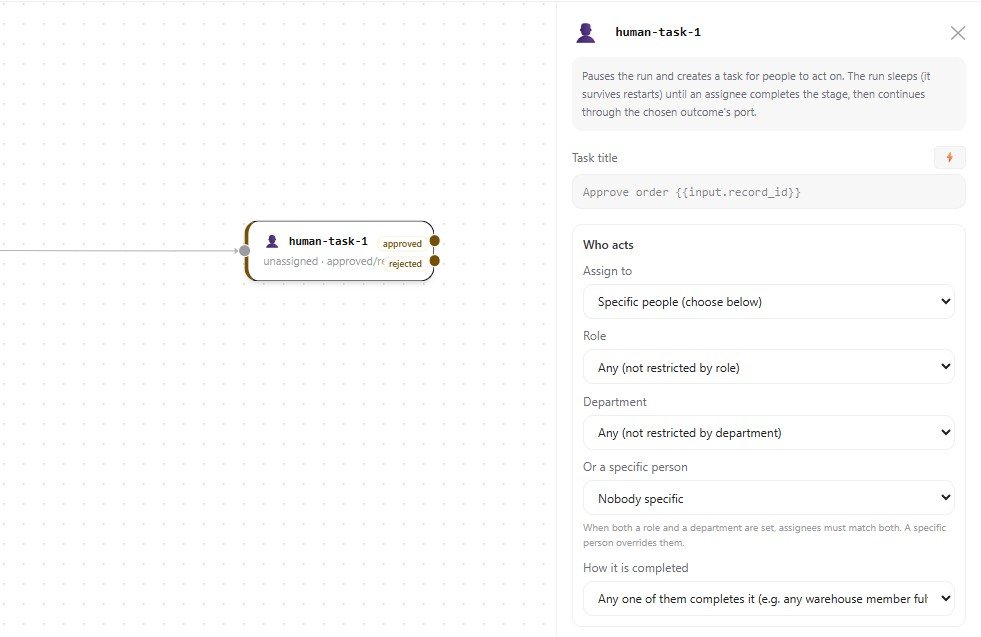
    The outcomes of a human task are not fixed. When the step is configured, the author names the possible outcomes, such as approved and rejected, and each outcome becomes its own path on the canvas. This matters because it means the workflow branches on what the person actually decided, not on a generic yes or no.

    Assigning the task is flexible in a way that matches how approval actually works in most companies. A task can go to a specific person chosen by name. It can go to anyone holding a particular role, such as an approver role, so that whoever currently holds that responsibility receives it, even if the person changes later. It can also be assigned relative to the run itself, such as the person who submitted it, that person's manager, or their whole management chain in order, which is useful for escalating approval automatically as an amount grows larger.

    There is also a setting for how the task is considered complete when more than one person could act on it. In the simplest case, any one person completing it is enough. In other cases, every assigned person must complete it, which suits a countersignature. It is also possible to require a set number of approvals out of a larger group, or to require people to act one after another in a fixed order, which suits a formal sign off chain.

    Picture the stock transfer example from earlier in this series again. A large transfer is routed to a human task assigned to the Consignment Approver role. The approver sees the transfer details already attached to the task, along with any instructions the workflow author wrote for them, and they choose either approved or rejected. Whichever they choose becomes the exact path the workflow continues down. If nobody acts in time, an optional timeout can move the task down its own separate path automatically, which is what allows an escalation to happen without anyone having to notice the delay themselves.
    APES Approval Node
    The settings panel for a human task step, the node an approval workflow pauses on. The task title accepts a template, so it can reference details from the run itself. Assignment can target a specific person, a role, a department, or both together, and the "how it is completed" setting decides whether any one assignee is enough or every assignee has to act before the workflow continues.

    The Notify Step, For Everything That Is Not a Decision

    Not every message inside a workflow needs a decision attached to it. Telling someone that their request was approved, or that a transfer has completed, does not require them to do anything at all. This is exactly what the notify step is for. It sends an in app notification to a person, a role, a department, or the person who originally submitted the run, and then the workflow continues immediately. It does not pause, and it does not need anyone to approve it, because there is nothing to approve.

    A notify step has a title and an optional longer message, and both can include details from earlier in the run, such as a reference number or a transfer amount. It can also carry an address, which is a link inside the app that the notification opens when someone clicks it, so a person can go straight to the record in question instead of having to search for it.

    In the transfer example, once the transaction step has moved the stock and the workflow has built a clean reference number, a notify step tells the original requester that their transfer is complete, referencing that same number. It is a small step, but it is the difference between a person finding out something happened and a person having to go looking for the answer themselves.

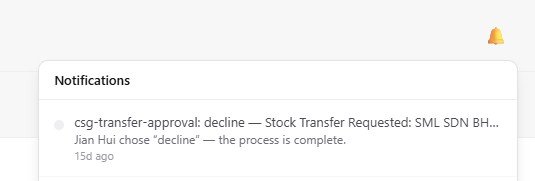
    The notification a person actually sees once a human task is resolved, in this case a stock transfer that was declined. This is the notify step at work, delivered straight to the bell icon in the app rather than a separate email a person might miss.
    The notification a person actually sees once a human task is resolved, in this case a stock transfer that was declined. This is the notify step at work, delivered straight to the bell icon in the app rather than a separate email a person might miss.

    The Callback Step, Waiting on Another System

    Sometimes a workflow is not waiting on a person at all, it is waiting on another system to get back to it. This is what the callback step exists for, and it is different from both of the steps above. A human task waits for a decision. A notify step waits for nothing. A callback step sends a request out to an outside system and then genuinely waits for that system to call back with an answer.

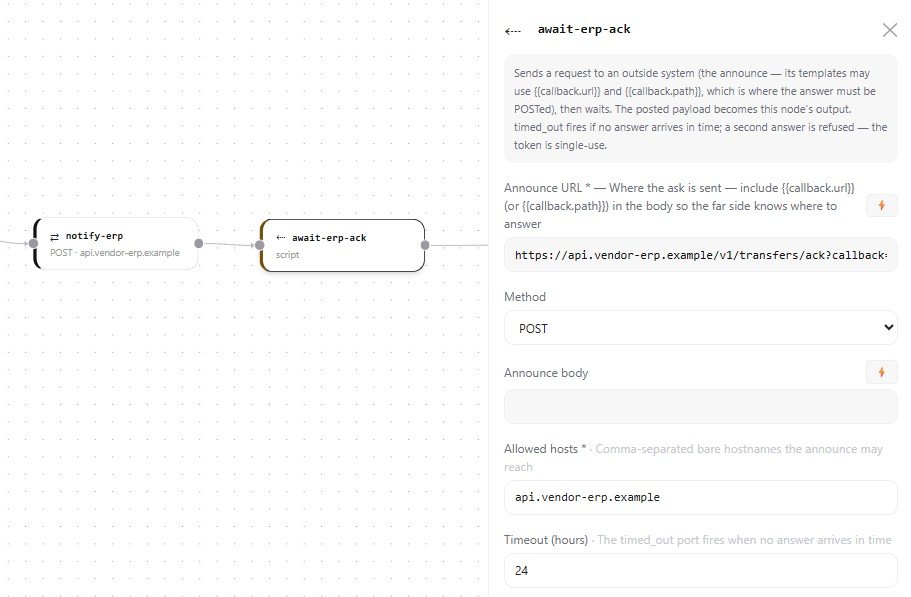
    The outbound part of a callback step is called the announce, and it works much like the HTTP step described earlier in this series, with a url, a method, and a declared list of hosts it is allowed to reach. The important difference is what happens afterward. The announce is expected to include a callback address in its body, so the far side knows exactly where to send its answer. The workflow then suspends and waits. Whatever gets posted back becomes the output of the step, available to every node that follows it.

    Two details make this step trustworthy rather than just convenient. A timeout can be set in hours, so a workflow does not wait forever for an answer that may never come, and a separate timed out path can handle that case cleanly. A signature secret can also be set, which means the answer must arrive carrying a cryptographic signature proving it really came from the system that was asked, rather than from anyone who happened to guess the callback address. Once an answer has been accepted, the same callback cannot be answered a second time, which closes off a class of mistakes where a duplicate or late response could confuse a run that has already moved on.

    Back in the transfer example, after the workflow notifies an external ERP system that a transfer has happened, a callback step can wait for that same ERP system to confirm it actually received and processed the update, rather than simply assuming the message got through. Only once that confirmation arrives does the workflow consider the transfer genuinely finished on both sides.

    The announce URL and allowed hosts work the same way as the HTTP step, but this callback node then waits for that system to post an answer back, with a 24 hour timeout so the workflow never waits forever for a response that may not come.

    Three Steps, One Idea

    Underneath the differences, all three steps answer the same basic question a workflow author has to ask at every point in a process. Does this step need a person to decide something, does it just need to tell someone something, or does it need an outside system to answer before moving on. A human task step, a notify step, and a callback step map onto those three answers directly, and most approval driven business processes are built from some combination of the three.

    The next post in this series turns to the part of APES that IT teams tend to ask about first, the security model. It covers exactly what a workflow is and is not allowed to reach, how secrets are kept out of a workflow's own definition, and what gets recorded when something goes wrong.